
CCS Orbit vs CCSCases: Which Fits Your Step 3 Preparation?
Step 3 preparation already comes with enough costs. CCS Orbit gives you a lower-cost way to practice CCS cases on your iPhone, with offline access and feedback that helps you decide what to work on next.
For focused CCS preparation, Orbit brings together 120+ cases, useful feedback and flexible access at a price that leaves more room in your Step 3 budget. You can practice between other commitments, review your mistakes and come back with a clear plan for the next case.
Here's how the two compare on price, daily practice and what you get from your feedback.
The short answer
Choose CCS Orbit if you want affordable iPhone CCS practice, offline cases and a clear way to work on recurring mistakes. Its 60-day Exam Pass costs US$34.99, while lifetime access costs US$59.99.
Choose CCSCases if you want more cases, computer and phone access, or an included multiple-choice question bank. Its published 2026 prices include US$90 for one month and US$95 for two months.
CCS Orbit is coming to the App Store; CCSCases is available now. The Orbit options below are its launch plans. Whichever you choose, make time for the official USMLE CCS software too.
CCS Orbit vs CCSCases at a glance
| What matters | CCS Orbit | CCSCases |
|---|---|---|
| Case library | 120+ cases | 180+ cases |
| Free access | Three complete cases; no account required | Two free cases |
| Cost for a short study window | US$34.99 for a 60-day Exam Pass | US$90 for one month; US$95 for two months |
| Upfront cost difference | US$60.01 less—about 63% lower for the 60-day Exam Pass versus CCSCases' two-month plan | US$95 for two calendar months |
| Longer access | US$59.99 lifetime | US$100 for three months; US$110 for six months |
| Device experience | App designed for iPhone | Modern browsers, including computers, iPhone and Android |
| Feedback emphasis | Six management domains, Decision Profile, Error Log and Focus Mode | Case grading, performance statistics and peer comparison |
| Practice formats | Learn and Exam modes; 10-minute and 20-minute cases | 10-minute and 20-minute cases; Rapid CCS and Multi CCS |
| Connection requirements | Cases and debriefs work offline | Browser-based simulator; offline simulation not verified in this review |
| Broader Step 3 resources | Focused on CCS practice | CCSQB question bank included |
The savings compare upfront prices for similar study windows. Sixty days and two calendar months can differ in length, and CCSCases also includes a question bank. Sources and pricing details are at the end.
A cheaper way to add CCS practice to your Step 3 plan
Between exam fees, question banks and self-assessments, it makes sense to be selective about another study purchase. If your main gap is CCS practice, look at what you'll actually use rather than buying the largest package by default.
Orbit's US$34.99 Exam Pass is US$60.01 less than CCSCases' US$95 two-month option—about 63% lower in upfront cost. The periods are slightly different, and CCSCases includes extra study resources, so this is a price comparison rather than a claim that the packages are identical.
If you want to keep access beyond that study window, Orbit's US$59.99 lifetime option removes the expiry date. There's no automatic renewal on either Orbit plan, and the Exam Pass ends 60 days after purchase. Regional prices and taxes appear in the App Store purchase sheet.
The practical appeal is straightforward: you can add interactive CCS practice without another large upfront bill. If you already have a question bank you like, a CCS-focused app may be all you need to add. If you want a question bank as part of the same purchase, CCSCases' included CCSQB is worth considering.
For learners who already have their multiple-choice preparation covered, Orbit is a practical, affordable way to add the CCS practice they need. These savings relate to CCS access; exam fees and other study purchases remain separate.
Phone practice: native app or browser?
You can practice on a phone with either product. CCSCases works in modern browsers, including Safari on iPhone.
Orbit gives you a dedicated iPhone app, with cases and debriefs that work offline. Read the presentation, place orders, advance simulated time and follow the patient's response. If you need to stop, Save & exit keeps your case ready to resume from Home.
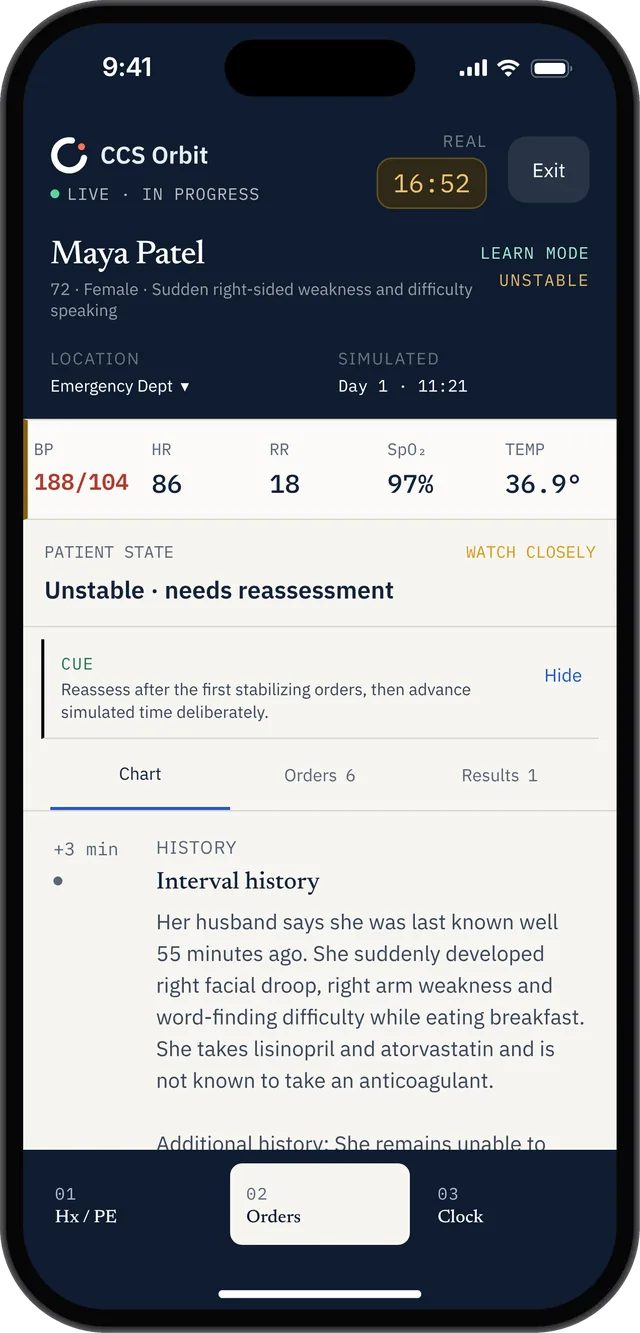
Read the presentation, review the patient state and build your management plan.
Orbit's clock controls let you move to the next result or choose a time interval, so you can practice deciding when to reassess as well as what to order.
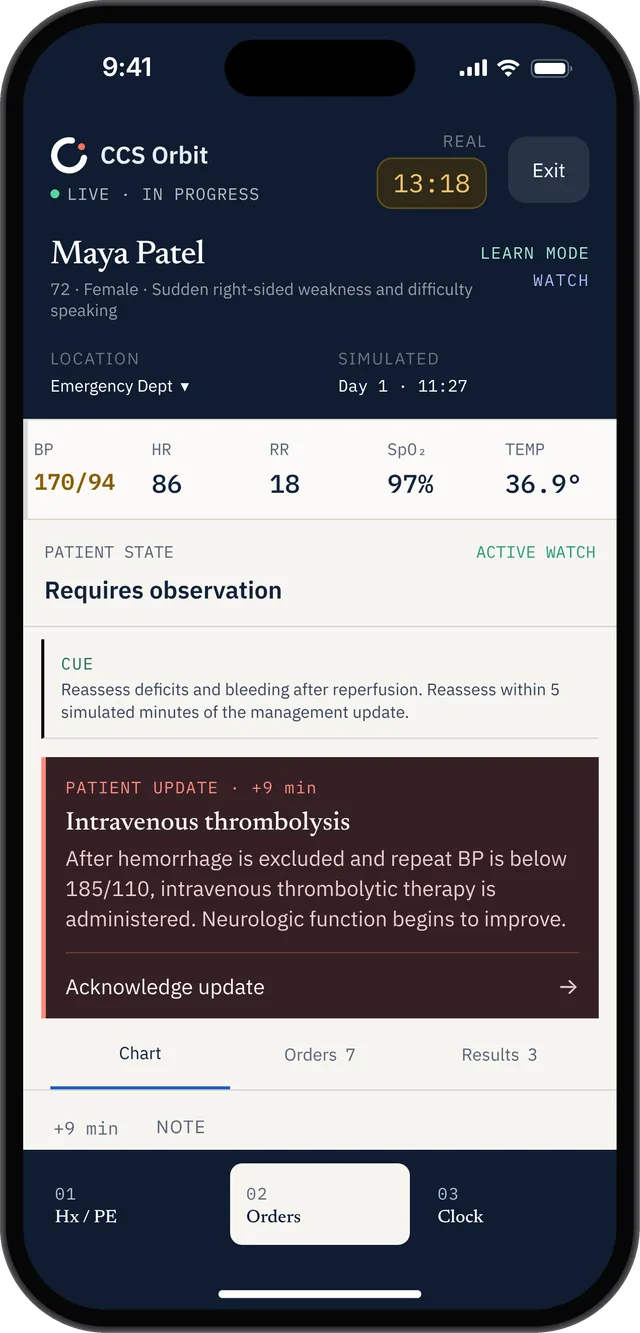
Updated vital signs and a patient update connect treatment to reassessment.
CCSCases also lets you save and return to an unfinished case. Orbit's dedicated app and offline access make it especially appealing when you want to fit a case into a break or practice somewhere without a reliable connection.
Try the free cases on the device you'll use most. Can you enter orders comfortably? Are results easy to review? Can you read the debrief without constantly zooming? Those small details matter when you're fitting practice around the rest of your day.
Feedback: what will you do differently next time?
Orbit's debrief breaks a case down into diagnosis, treatment, monitoring, timing, sequencing and location. Instead of stopping at a total score, you can see which decisions need attention.
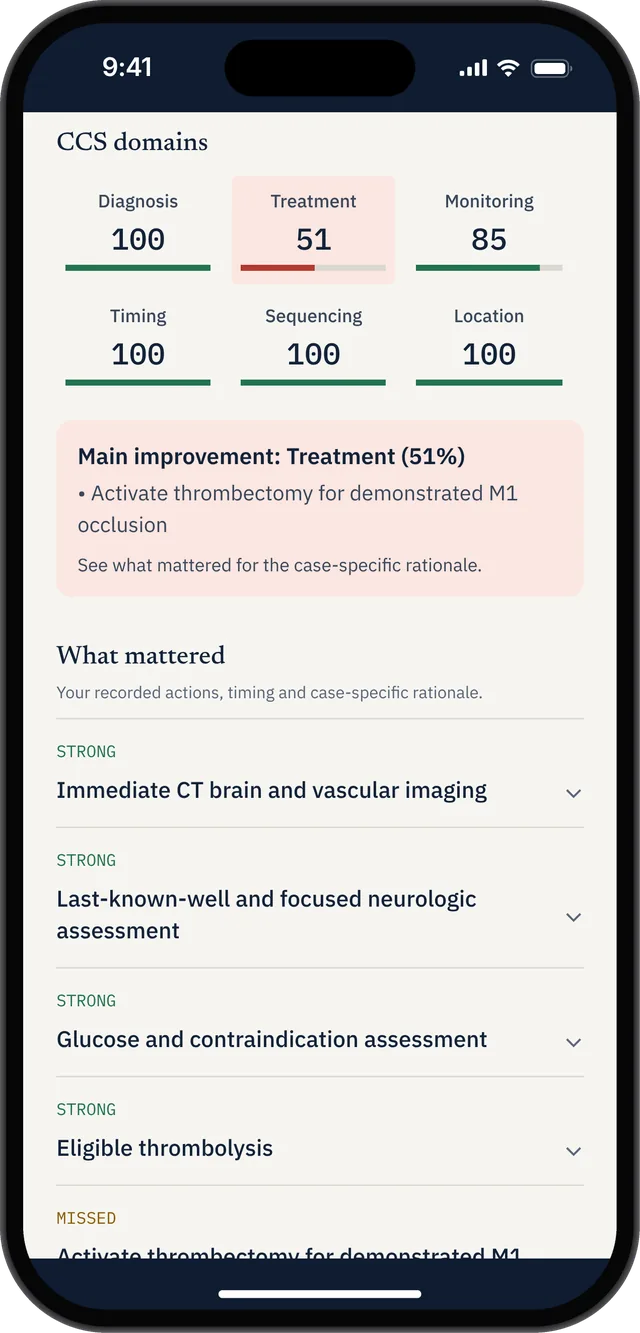
Six management domains and specific explanations turn the result into a next step.
The Decision Profile brings together your completed attempts. The Error Log helps you revisit recurring mistakes, while Focus Mode helps you choose cases for the domain you want to practice. Together, these tools give each session a useful direction: spot a pattern, choose a focus and put it into practice.
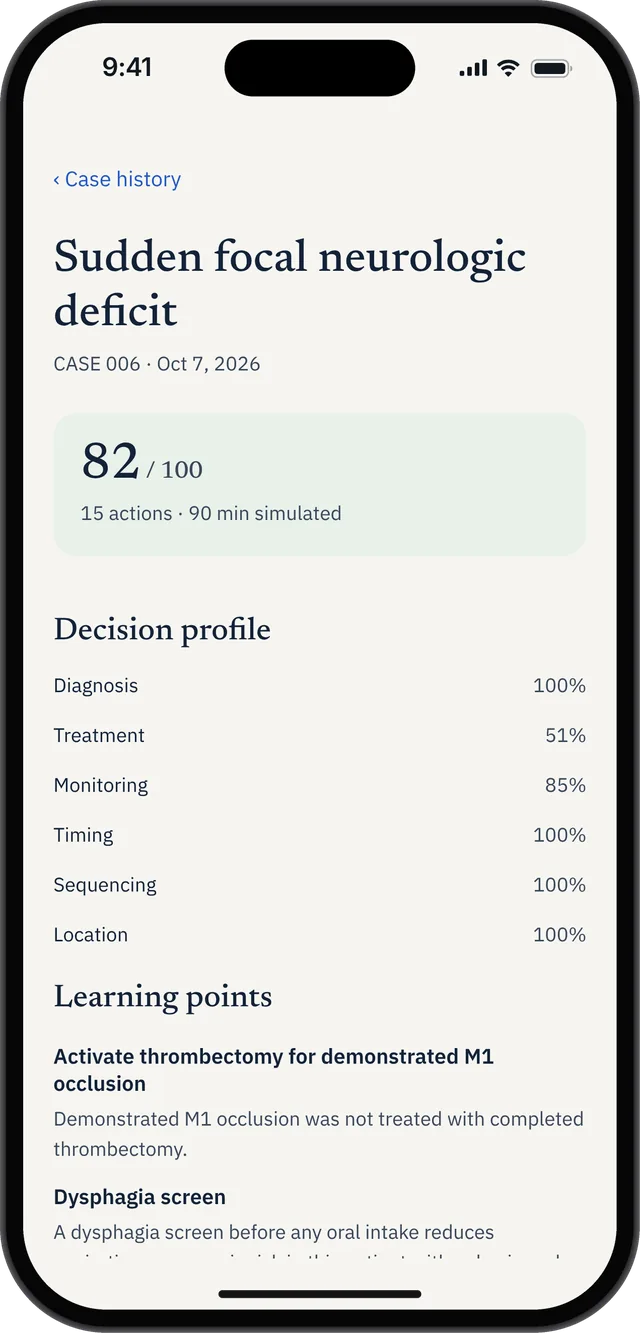
Case history preserves the domain breakdown and learning points for later review.
The Error Log puts recurring decisions in one place. You can filter missed, late or out-of-sequence actions and sort by frequency, making it easier to choose what deserves your attention next.
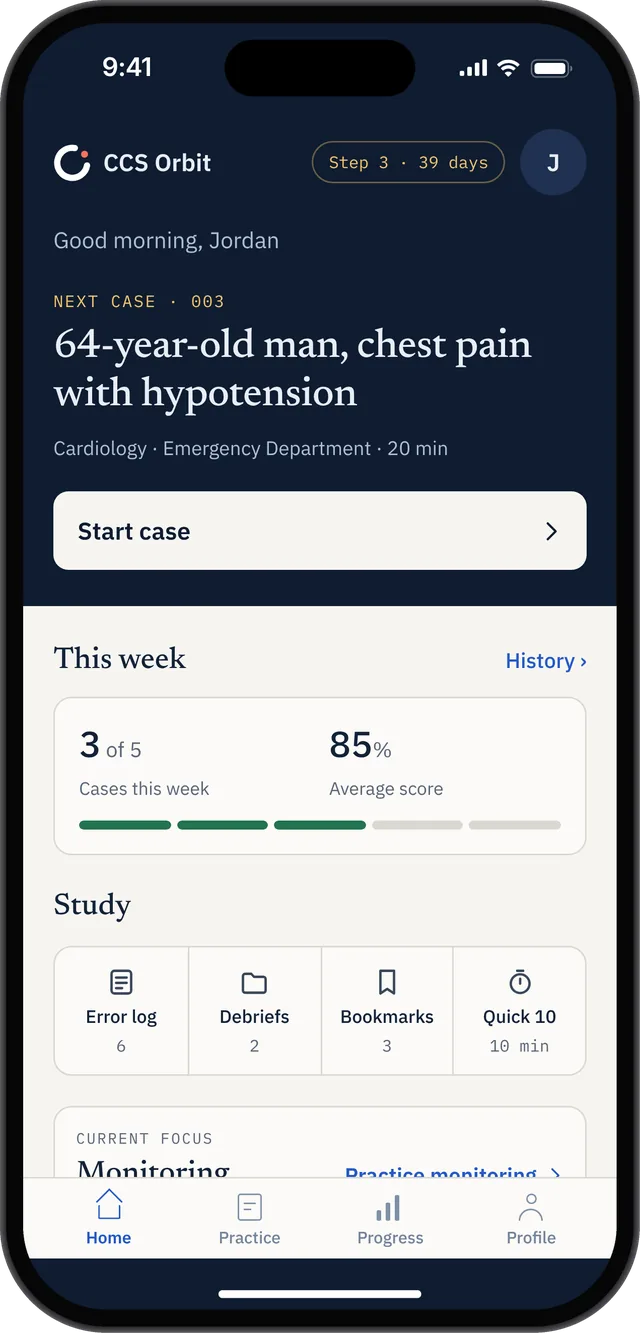
Home combines the next-case preview with weekly practice and study shortcuts.
If timing keeps coming up, give your next case a simple goal: decide what you're waiting for before advancing the clock. Afterward, check whether you reassessed the patient when you meant to. You have something specific to work on, rather than just another score to collect.
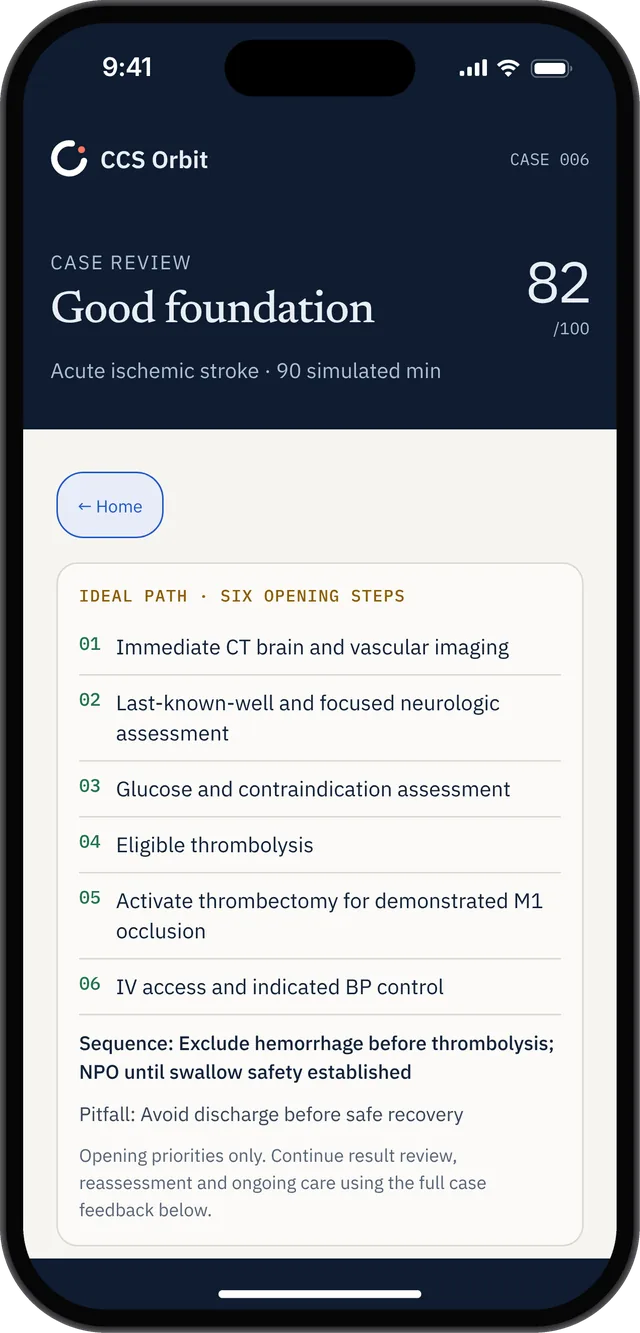
The case review summarizes six opening priorities with a case-specific sequence reminder.
CCSCases also provides grading, performance statistics and peer comparisons. Its July update made order importance clearer in the grading report.
With either resource, look for feedback you can use in the next case. A higher score is satisfying, but knowing what to change is more useful for planning your practice.
Case volume and practice formats
CCSCases has the larger library: 180+ cases compared with Orbit's 120+ at launch. If you want more distinct presentations to work through, that's a real reason to consider it. Just don't treat the count as a shortcut for judging clinical accuracy or how much you'll learn from each case.
Its Rapid CCS format lets you work through cases more quickly, and Multi CCS supports consecutive cases. Both products can therefore fit into shorter study windows.
Orbit gives you Learn and Exam modes. Learn mode provides guidance and trap warnings; Exam mode keeps teaching cues out of the case so you can review your decisions afterward. You can get support when a presentation is unfamiliar, then return for an unprompted attempt as your confidence grows. Exam mode uses Orbit's practice interface and training criteria.
Pick the format that fits today's task: some guidance for an unfamiliar presentation, an unprompted attempt to check your decisions, or a run of cases to practice switching between patients.
Pricing: compare the access window and what is included
Here's the fuller price breakdown. Orbit's prices are its launch plans; CCSCases' prices are from its January 2026 announcement. Check the final checkout or App Store price before buying.
| Product and access period | Price in US dollars |
|---|---|
| CCS Orbit: 60-day Exam Pass | $34.99; one-time purchase, no automatic renewal |
| CCS Orbit: lifetime access | $59.99; one-time purchase |
| CCSCases: one month | $90 |
| CCSCases: two months | $95 |
| CCSCases: three months | $100 |
| CCSCases: six months | $110 |
If your preparation window is short, Orbit's Exam Pass keeps the upfront cost low. If your schedule is uncertain, lifetime access means you won't need to buy another Orbit access period just because your exam date moves.
Orbit keeps the choice simple: a lower-cost pass for your preparation window, or lifetime access for more flexibility. CCSCases' included CCSQB may also be useful if you want broader Step 3 practice in the same purchase.
CCSCases lets you schedule activation up to 90 days ahead; otherwise access starts at purchase. Once active, it can't be paused. Orbit's Exam Pass runs for 60 days after purchase. These are continuous access periods rather than individual practice days.
Which should you choose?
CCS Orbit is a great fit when
- You want a lower-cost route to focused CCS practice.
- You specifically want an iPhone app and offline cases.
- You want actionable feedback, a record of recurring mistakes and a clear focus for the next session.
- You want lifetime access for less than CCSCases' published one-month price.
- The Exam Pass or lifetime option fits your schedule, and you can wait for launch.
Consider CCSCases when
- You want the larger advertised library or need to study across different devices.
- Rapid CCS or consecutive-case practice matches your study plan.
- You value the included question bank or need an available resource now.
You don't need to buy both just to feel covered. Start with the gap you're trying to fill. Add another resource only when its content or workflow gives you something you'll actually use.
Neither replaces official CCS software practice
USMLE emphasizes practicing the CCS interface and case-management mechanics before the examination. Its guidance also explains that timing and sequencing matter, and that delayed or incorrectly sequenced decisions may receive no credit.
Use official materials for interface familiarization alongside whichever commercial resource you select. Orbit explicitly states that its training criteria are not the official scoring algorithm; do not interpret its percentages as predicted examination results.
Explore CCS Orbit before deciding
CCS Orbit includes three complete free cases at launch, so you can try the case workflow and debrief before paying. Explore the app and get a launch notification.
For affordable CCS practice on your iPhone, Orbit offers a compelling combination: 120+ cases, offline access and feedback that gives you a clear next step. Start with the free cases at launch, then choose the US$34.99 Exam Pass or US$59.99 lifetime option to suit your schedule.
For broader resource selection, read our CCSCases alternatives guide. For practice mechanics, see how simulated time works.
Sources
Product information and prices checked October 5, 2026. Orbit prices are its launch plans; CCSCases prices are from its published 2026 announcement. Final regional prices and taxes are shown at purchase. Case counts are provider figures.
- CCS Orbit: features and screenshots, pricing and FAQ.
- CCSCases: case library, free cases and grading.
- CCSCases: 2026 pricing announcement.
- CCSCases FAQ: browser support, saved sessions and access periods.
- CCSCases: grading and simulator updates.
- CCSCases: Rapid CCS and Multi CCS.
- CCSCases: included CCSQB question bank.
- USMLE: official computer-based case simulation guidance.