
CCS Orbit vs StudyCCS: Which Fits Your Step 3 Preparation?
Compare the cost, practice workflow and learning tools: CCS Orbit brings CCS practice to iPhone, while StudyCCS combines simulation with rapid drills and broader Step 3 resources.
If you are choosing a CCS resource, the question is how it fits your study time, budget and learning needs. CCS Orbit is designed for focused iPhone practice, including offline cases, debriefs and tools for finding recurring mistakes. StudyCCS combines a full simulator with rapid order drills and a broader Step 3 toolkit.
Orbit is a lower-cost option for candidates who want a dedicated CCS app. Its launch pricing is US$34.99 for a 60-day Exam Pass or US$59.99 for lifetime access. Both are one-time purchases, and three cases are free at launch.
CCS Orbit is coming soon to the App Store. StudyCCS is available now. This comparison uses Orbit's launch offer and StudyCCS's public product and checkout pages checked on October 13, 2026. Sources are linked at the end.
CCS Orbit vs StudyCCS at a glance
| What matters | CCS Orbit | StudyCCS |
|---|---|---|
| Main focus | CCS practice on iPhone, with feedback that guides the next attempt | Full CCS simulation, rapid order drills and broader Step 3 tools |
| Case library | 120+ cases at launch | 100+ cases listed |
| Short-window price | US$34.99 for 60 days | US$69 for one week; US$79 for one month in the current sale |
| Longer access | US$59.99 lifetime | US$89 for six months in the current sale |
| Purchase model | One payment; no automatic renewal | One-time fixed-duration access |
| Practice experience | App designed for iPhone | Web-based platform |
| Offline cases and debriefs | Included | Offline simulation not confirmed in the public pages reviewed |
| Feedback emphasis | Six domains, management timeline and specific decisions | Detailed case grading, missed orders and harmful actions |
| Across-attempt learning | Decision Profile, Error Log and Focus Mode | Check current product details for equivalent tools |
| Practice formats | Learn and Exam modes; 10-minute and 20-minute cases | Full simulator and SpeedOrder |
| Broader exam resources | Focused on CCS | QBank, course and reference resources included |
| Availability | App Store launch coming soon | Available now |
The comparison reflects different bundles and access periods. It does not assume that a feature absent from a public description is absent from the product.
Cost: a smaller upfront CCS purchase
Step 3 preparation can involve several purchases before you reach CCS. A focused resource can keep that part of the budget manageable.
| Access option | Price | What the price difference means |
|---|---|---|
| CCS Orbit 60-day Exam Pass | US$34.99 | US$44.01 less than StudyCCS's current one-month sale price, with a longer access window |
| StudyCCS one-month access | US$79 | Current sale price; regular price shown as US$89 |
| CCS Orbit lifetime | US$59.99 | US$29.01 less than StudyCCS's current six-month sale price, with no expiry |
| StudyCCS six-month access | US$89 | Current sale price; regular price shown as US$99 |
These are upfront purchase comparisons, rather than equivalent bundles. StudyCCS includes resources beyond CCS simulation. Orbit's value is its focused mobile workflow, learning feedback and lower entry cost.
Both Orbit options unlock the same full case library and learning features. Choose the Exam Pass if 60 days suits your preparation window. Choose lifetime if you prefer access without an expiry date. Regional prices and applicable taxes appear in the App Store purchase sheet.
Practice that fits around your day
The usefulness of a practice resource depends partly on whether you can return to it consistently. Orbit puts case management and review on the device you already carry.
Start a case when you have a clear window. Open an earlier debrief during a shorter break. If a session is interrupted, choose Save & exit to preserve the patient state, orders and remaining time, then resume from Home.
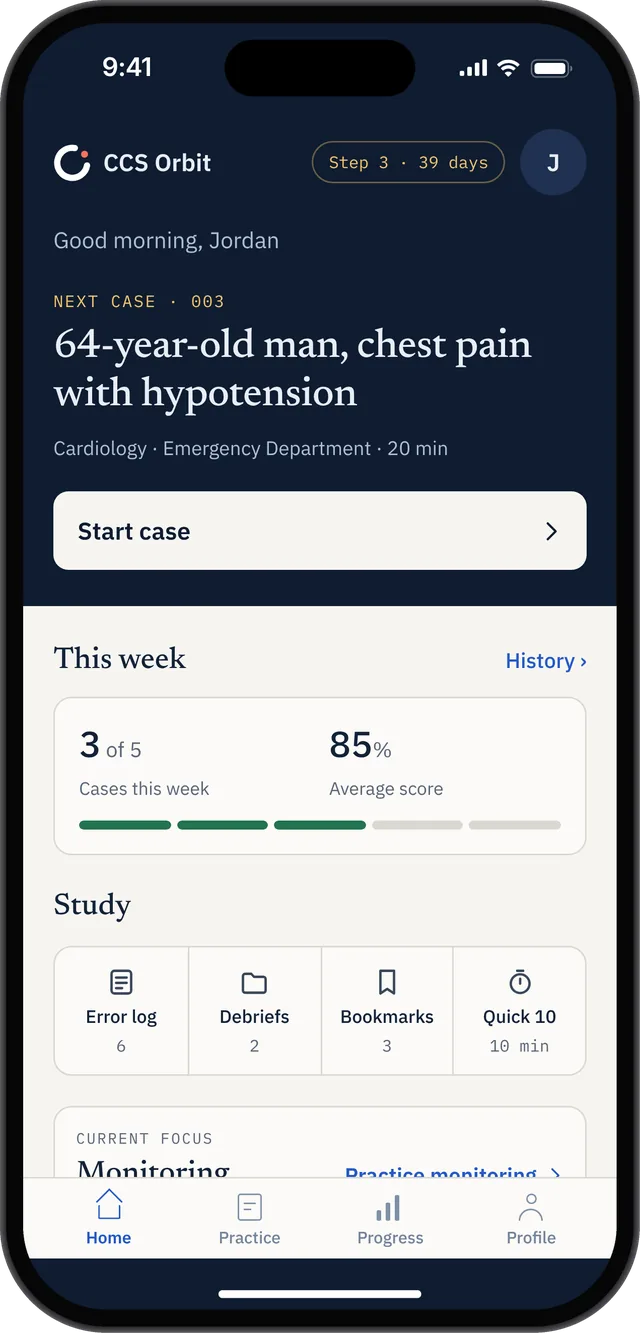
Cases and debriefs work offline once the app is installed and you have access to the cases. You still need internet to download or update the app, purchase or restore Orbit Plus, and send feedback. No CCS Orbit account is required.
That makes Orbit useful for a train journey, a quiet break or a study space with unreliable Wi-Fi. A complete case still deserves attention: allow time for the attempt and its debrief, and keep some sessions uninterrupted as the exam approaches.
Explore the iPhone and offline practice walkthrough.
Full patient management and rapid order drills serve different needs
StudyCCS's SpeedOrder presents a clinical scenario, asks for orders, then reveals the diagnosis and provides scoring. It sits alongside the full simulator as a way to rehearse order selection across presentations.
That can suit a learner whose immediate priority is recalling an opening workup. A different practice goal is following what happens after the initial decisions: reviewing results, reassessing, adjusting care and deciding when to advance time.
Orbit's case workflow centers on that management loop. Place orders, choose the care location, advance simulated time and respond to the patient's course. Learn mode supplies guidance and trap warnings; Exam mode removes in-case teaching cues, with feedback available afterward.
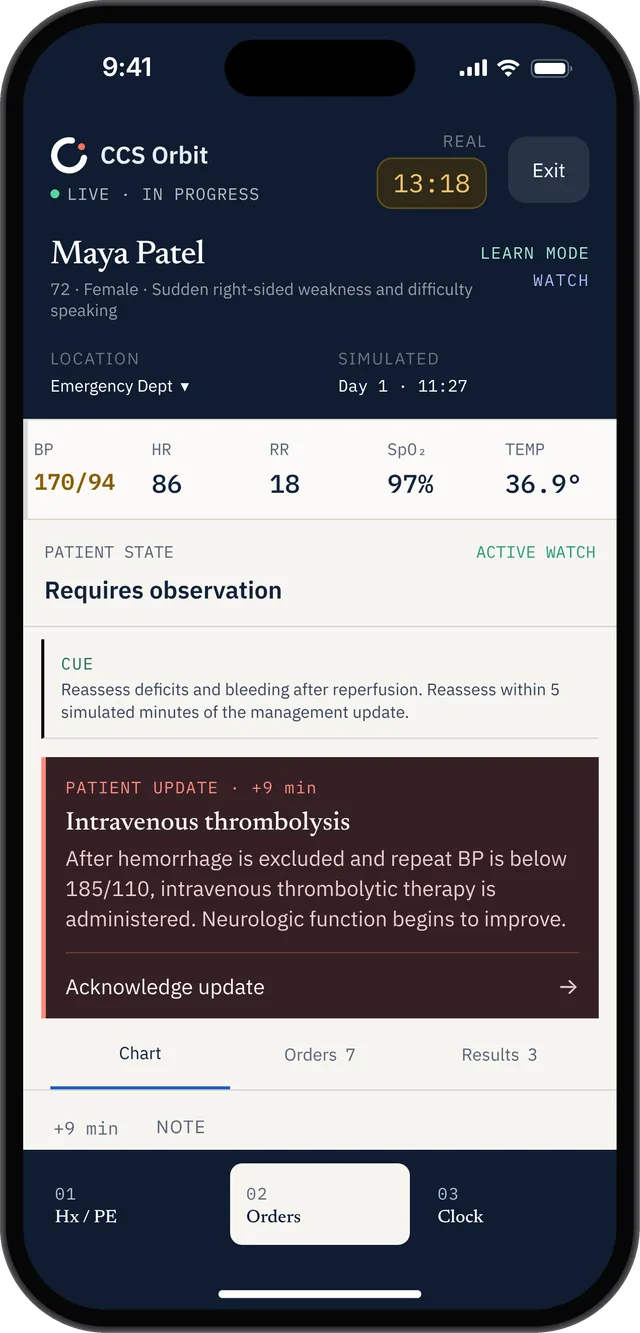
Full cases and order drills can both have a place in preparation. The useful question is which skill you need to work on today. If you can name the initial orders but lose track of follow-up, a complete management attempt gives you a more relevant task.
Feedback: turn a result into a specific change
Both products provide case feedback. Orbit makes diagnosis, treatment, monitoring, timing, sequencing and location visible as separate learning domains, then connects the result to decisions in the attempt.
A sample stroke attempt illustrates why that matters. Its overall result is 82/100, while the treatment domain is 51%. The detailed feedback identifies a specific missed treatment decision. The overall score alone would give the learner much less direction.
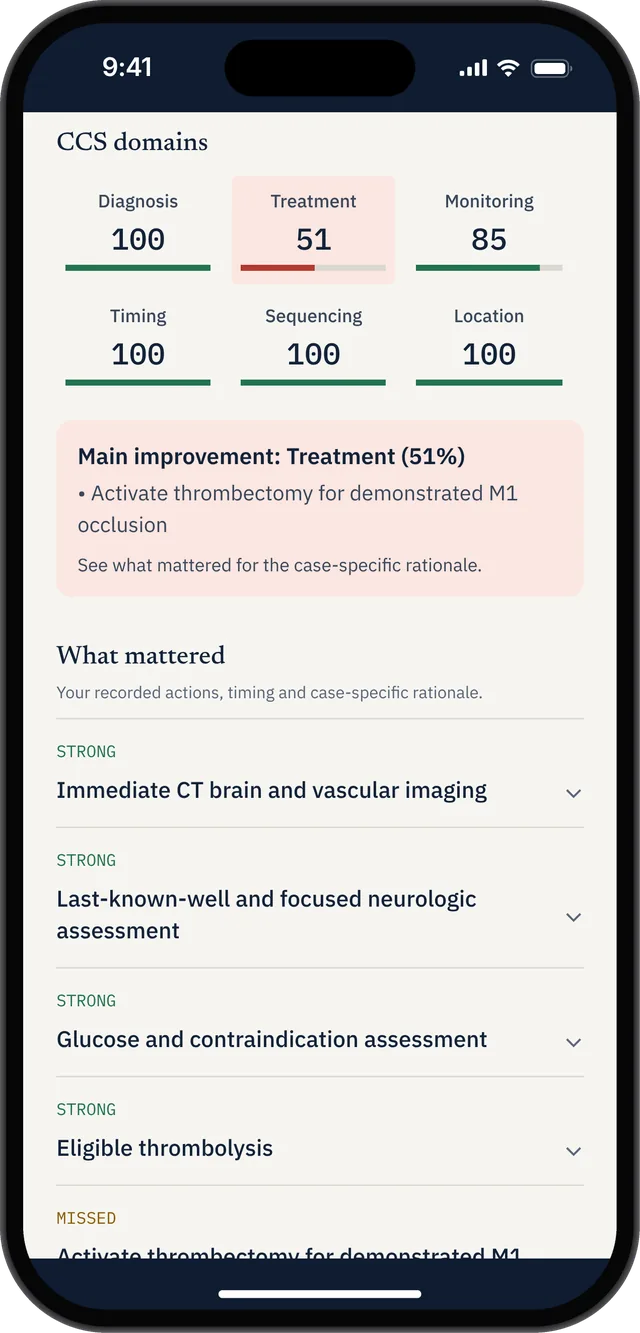
Use the debrief to answer three practical questions:
- Which decision most needs improvement?
- Was it missed, delayed, placed in the wrong sequence or followed by insufficient reassessment?
- What will I do differently in the next related case?
The aim is a concrete change to your approach. An improved percentage can be useful feedback, but your practice result is not an official USMLE score or a pass prediction.
Carry the lesson into the next attempt
An individual debrief is useful. A pattern across attempts can help you choose what to practice next.
Orbit's Decision Profile brings together the six domains across completed attempts. The Error Log helps you find recurring mistakes, with filters and sorting by frequency, recency or domain. Focus Mode helps you choose cases around your weakest domain or another focus you select.
Case history also lets you return to the breakdown and learning points for an earlier attempt.
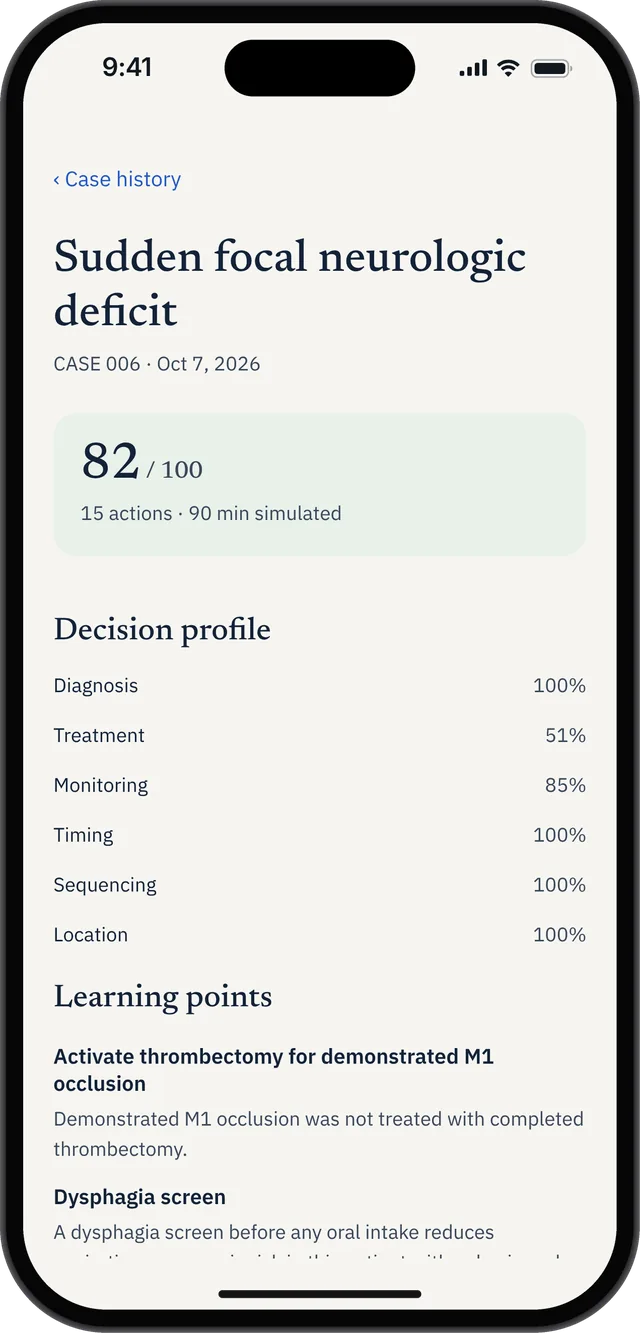
A practical routine is to review one recurring issue, choose a related case, make the intended change, then inspect the next debrief. For example, if monitoring keeps needing work, decide before starting what information will help you judge the patient's response and when you should check it.
That is the connection between a past attempt and a purposeful next session. You can read more about using practice feedback in our CCS scoring guide.
When the broader StudyCCS bundle may suit you
StudyCCS includes a Rapid QBank, an order database, a Step 3 walkthrough course, reference material and score tools. It also advertises a Step 3 pass guarantee.
If you want those resources together with a web simulator, its bundle may fit your preparation. If you already have your broader Step 3 resources and want a focused iPhone CCS app, Orbit's lower-cost access and connected review tools may be a better fit.
Neither choice removes the need to become familiar with the official examination software. Use the official USMLE Step 3 practice materials alongside your chosen commercial resource.
Is CCS Orbit a good StudyCCS alternative?
Yes, if your priority is affordable CCS practice on iPhone, offline access and learning from recurring mistakes. Orbit brings 120+ cases, six-domain debriefs, case history, Decision Profile, Error Log and Focus Mode into one practice workflow.
At launch, three cases and their full debriefs will be free. You can experience the management loop before choosing the US$34.99 Exam Pass or US$59.99 lifetime access. Both are one-time purchases with no automatic renewal.
See how CCS Orbit works, or get one email when it launches.
Sources and checked details
Product information and prices checked October 13, 2026. StudyCCS prices above are its displayed Fall Sale prices; access periods differ from Orbit's launch plans. This article is published by CCS Orbit and compares its own product with StudyCCS using public product information. It is not a hands-on review of StudyCCS's paid simulator.
- StudyCCS checkout: current promotional and regular prices, access periods and included bundle.
- StudyCCS product overview: simulator, SpeedOrder and wider study resources.
- StudyCCS comparison page: case count, workflow and feedback examples.
- CCS Orbit walkthrough and pricing: mobile practice, feedback tools and launch offers.
- Official USMLE Step 3 materials: official preparation resources.
StudyCCS and CCS Orbit are independent products. Product names belong to their respective owners.