
CCS Orbit: A CCSCases Alternative for iPhone Practice
Discover CCS Orbit, an iPhone CCSCases alternative for USMLE Step 3, with offline cases, Learn and Exam modes, and feedback on your decisions.
CCS Orbit is an upcoming iPhone app for USMLE Step 3 CCS practice. Manage a simulated patient, place orders, advance simulated time and review the decisions behind your result. Cases and debriefs work offline, so practice can fit into the gaps in a working week.
If you are looking for a CCSCases alternative for mobile study, this guide introduces Orbit's approach: a full patient-management loop, guidance when you want it, and feedback to help you choose what to practice next.
Step 3 CCS practice built around your iPhone
CCS Orbit is designed for doctors fitting exam preparation around clinical work. Its planned launch library includes 120+ CCS cases, with three free cases and no account required to get started.
A case asks you to make decisions as the patient evolves. You choose investigations and treatment, decide when to advance simulated time, review new information and reassess your management.
The app also supports interrupted sessions. Use Save & exit to preserve the patient state, orders and remaining time, then resume the saved case from Home.
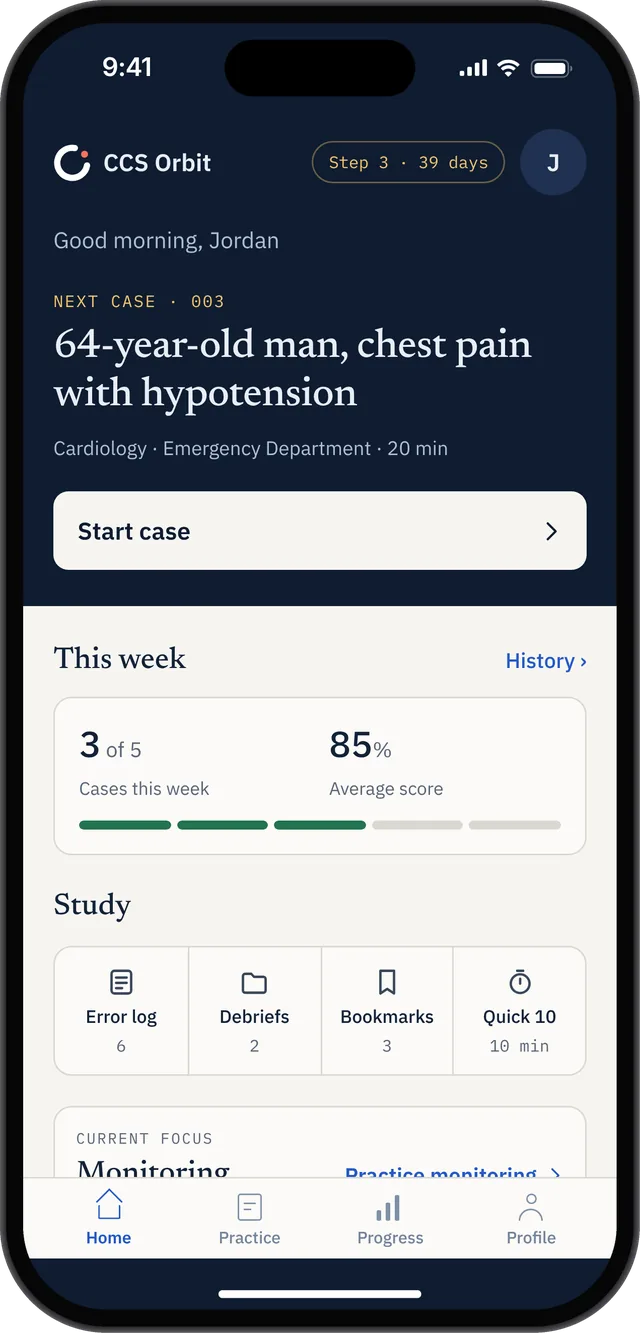
Home brings the next case, weekly practice and review tools together. The screen shows an example study profile.
Manage the patient, then follow what happens
A useful practice session follows the patient beyond the opening orders. In Orbit, that means working through three connected stages.
Manage
Read the presentation and assess what needs attention first. Enter your orders, choose the appropriate care location and decide what information you need before moving the case forward.
Give each order a purpose. Ask yourself what question it answers, what problem it treats or what change it helps you monitor. This is a useful habit to rehearse across different presentations.
Reassess
As results and patient updates return, consider whether your initial plan still fits. Review investigations, repeat focused examinations where appropriate and decide what needs to happen next.
Before advancing simulated time, identify what you are waiting for: a result, a treatment response or a planned review. If the clock is a recurring difficulty, our guide to simulated time in Step 3 CCS explains how it differs from the real-time case timer.
Learn
After the case, connect your result to the management decisions you made. Orbit's debriefs link feedback to specific actions and the timeline, helping you identify what was missed, delayed or completed in the wrong sequence.
Choose one decision to carry into the next session. For example, “decide when to reassess after initial treatment” gives you a specific habit to watch in another case.
Choose Learn mode or Exam mode
CCS Orbit provides two ways to approach a case:
| Mode | What happens during the case | Suggested use |
|---|---|---|
| Learn | Guidance and real-time trap warnings are available | Work through an unfamiliar presentation or practice a habit you find difficult |
| Exam | In-case teaching cues are suppressed; review the debrief afterward | See how you manage the patient without those prompts |
The choice lets you vary the support you receive. You might start a new presentation in Learn mode, review the feedback, then attempt another case in Exam mode.
Exam mode remains a practice setting. Use it alongside official software familiarization and your broader Step 3 preparation.
Use your debrief to decide what to practice next
Orbit provides feedback across six management domains: diagnosis, treatment, monitoring, timing, sequencing and location.
The Decision Profile brings together performance across completed attempts. The Error Log helps you review recurring mistakes, while Focus Mode lets you browse cases that target a selected domain.
Use those views to give your next session a purpose. If monitoring is a recurring weakness, pick a relevant case and pay attention to what needs monitoring, when reassessment should occur and how the response changes your plan.
The aim is to make the feedback useful in another presentation. After reviewing a case, write down:
- The decision you want to improve.
- The point in the case when it should happen.
- The finding that would prompt you to change course.
A later attempt gives you a chance to apply that plan without relying on the order list from a familiar case.
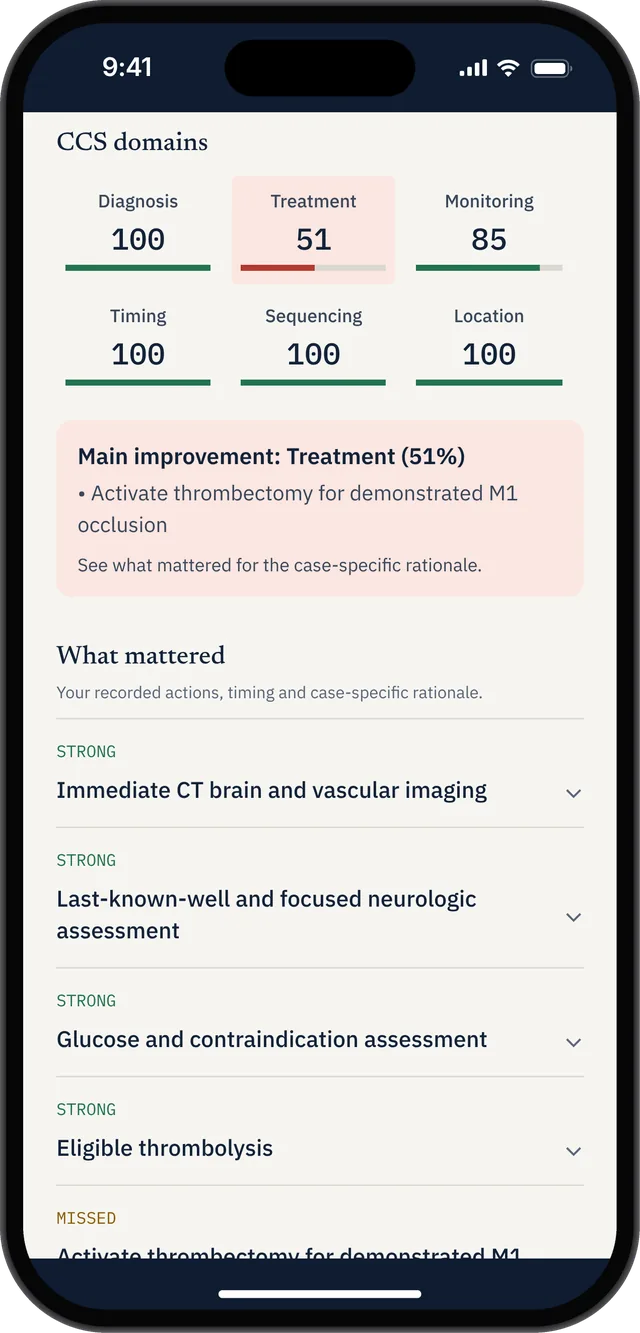
The six-domain debrief identifies a specific treatment gap to work on in another attempt.
Practice offline and keep short sessions useful
CCS Orbit's cases and debriefs work offline. That makes them available for study when reception is unreliable, as well as when you have a quiet window at home.
The app includes 10-minute and 20-minute cases. Allow time afterward to review your decisions; a completed case and a considered debrief are different parts of the session.
Match the task to the time available:
| Time available | A practical Orbit session |
|---|---|
| A few minutes | Review a previous debrief or one recurring mistake |
| A longer quiet window | Complete a case and review its timeline |
| An interrupted session | Save the case, then resume when you can follow the patient properly |
These are suggested study routines. Choose a workload you can sustain alongside the rest of your preparation.
Looking for a CCSCases alternative?
CCSCases supports iPhone access through a modern browser, according to its official device FAQ. CCS Orbit is a separate product designed as an iPhone app, with offline cases and debriefs.
If phone-based practice is your priority, consider whether Orbit's workflow fits your needs: managing the patient, reviewing the response and using your feedback to plan the next session. Our CCSCases alternatives guide covers the wider resource choices.
Keep official CCS software practice in your plan
CCS Orbit cases use authored clinical pathways and physician-reviewed training criteria; you can read more about the approach on our About page.
You should also practice with the official USMLE Step 3 CCS materials. USMLE emphasizes familiarity with the software interface and the mechanics of managing cases.
Schedule computer-based sessions to rehearse navigation, order entry, clock controls and reviewing information with a keyboard and mouse. Combine that interface practice with the management decisions and debrief review you work on in Orbit.
Orbit's training scores do not predict an official examination result.
Get ready to try CCS Orbit
CCS Orbit is coming to the App Store, with three free cases planned at launch. Explore CCS Orbit and sign up for the launch notification to see how the app fits your Step 3 study plan.
Three cases are free. Orbit Plus offers a 60-day Exam Pass for US$34.99 or lifetime access for US$59.99. These are the only two paid options. Both are one-time purchases with no automatic renewal or monthly subscription. Regional prices and applicable taxes appear in the App Store purchase sheet. See Orbit Plus options.
For a focused price and feature comparison, read CCS Orbit vs CCSCases.
Sources
- CCS Orbit product page and practice FAQ — features, case library and availability.
- About CCS Orbit — development and case-review approach.
- CCSCases FAQ — supported devices.
- USMLE Step 3 Formats & Questions — official CCS preparation guidance.
CCS Orbit is an independent educational resource. It is not affiliated with CCSCases.com or the organizations that administer USMLE.