
How Simulated Time Works in USMLE Step 3 CCS
Learn how simulated time works in USMLE Step 3 CCS, when to advance the clock, how results return and which timing mistakes to avoid.
The clock is not just a way to reach the end of a CCS case. It is the mechanism that processes orders, returns results, reveals treatment effects and allows the patient’s condition to change.
That makes simulated time a clinical decision. Advance too soon and you may delay treatment. Jump too far and you may miss the moment when the patient needed reassessment. Refuse to advance and nothing happens—even if your orders are correct.
The goal is to move time forward with a reason: stabilize first, identify what you are waiting for, choose a safe interval, then reassess before the next jump.
The two clocks in every CCS case
CCS presents two different kinds of time. Keeping them separate prevents a common source of confusion.
| Clock | What it measures | What it means for you |
|---|---|---|
| Real time | Your workstation countdown | The maximum time available to manage the case. Current cases allow a maximum of either 10 or 20 minutes. |
| Simulated time | Time passing for the patient | May represent minutes, hours, days, weeks or months. It advances only through actions in the case software. |
The current USMLE format lists 13–14 CCS cases on Day 2, with a maximum of 10 or 20 minutes of real time per case. See the official Step 3 exam format.
A 10-minute case is not limited to 10 minutes of patient time. Within that short real-time window, the simulated patient may move through hours or days. Conversely, a 20-minute case may require careful decisions across weeks or months.
What simulated time controls
The official CCS overview explains that advancing the clock is what makes events occur in the simulation. Read the USMLE CCS overview.
As simulated time passes:
- Diagnostic tests and procedures can be processed and reported.
- Ordered therapies can begin and their effects can become apparent.
- The underlying disease can improve, persist or worsen.
- The patient, family or healthcare team may provide an update.
- A scheduled follow-up point may be reached.
Time does not correct an incomplete plan. If essential treatment, monitoring or location decisions are missing, advancing the clock can expose the consequences of those omissions.
Actions that advance time automatically
Not every time change begins with the clock menu. Requests for interval history and physical examination findings automatically advance simulated time. This is clinically sensible: examining a patient and asking how they feel take time.
Do not interpret this as a reason to skip the examination. Instead, order an appropriate examination when it can change management, and remember that even a seemingly small action moves the case forward.
A useful habit is to look at the simulated timestamp after an examination or interval history. Reorient yourself before entering the next orders.
Three practical ways to move the clock
1. Advance to the next available result
This option moves simulated time to the next pending result. It is often the most controlled choice when you have placed several orders and want the earliest new information without guessing how long it will take.
Use it when the next result could change management. After the result appears, pause, interpret it and decide whether treatment, monitoring, location or the working diagnosis should change.
2. Advance by a chosen interval or to a selected time
A selected interval is useful when the clinical reassessment point matters more than the next laboratory result—for example, checking a response after an appropriate period of treatment or allowing time for a stable condition to evolve.
Choose the smallest interval that answers the clinical question. The sicker or less predictable the patient, the shorter and more controlled the jump should usually be.
3. Schedule a future appointment
Outpatient and longer-term cases may require follow-up after days, weeks or months. A scheduled appointment can bring the patient back for reassessment, monitoring and continued management.
The official instructions state that a requested appointment is canceled when a clock advance is stopped to review processed results. After an interruption, review the appointment status and reschedule when follow-up remains indicated.
The five-question check before every time jump
Before clicking the clock, stop for a brief safety check:
- What exactly am I waiting for—a result, a treatment response, a patient update or a follow-up visit?
- Have I already started any treatment that should not be delayed?
- Is appropriate monitoring active during the interval?
- Is the patient in a setting that can safely support this wait?
- How long can I safely go before reassessing?
If you cannot name what you are waiting for, advancing time is probably premature or unfocused.
Match the size of the jump to the patient
| Clinical situation | Better timing approach | Why |
|---|---|---|
| Unstable or time-sensitive presentation | Treat immediate threats, then use short controlled advances. | Deterioration may occur quickly; early reassessment can change the next action. |
| Stable patient awaiting a key result | Advance to the next available result. | You receive the earliest pending information without overshooting it. |
| Response to an acute treatment | Choose an appropriate short interval, then reassess. | The decision depends on whether the intervention is working. |
| Stable inpatient course | Advance to a meaningful monitoring or reassessment point. | Avoid repeatedly checking without allowing enough time for a useful change. |
| Chronic outpatient management | Use longer intervals and planned follow-up when appropriate. | The effect of treatment and long-term monitoring may unfold over weeks or months. |
These are decision principles, not fixed intervals. The safe amount of simulated time depends on the patient, the disease process, the treatment and the information you already have.
Read report times before advancing
After orders are confirmed, report times appear on the order sheet. They tell you when results are expected within simulated time.
Report times help you choose between waiting for the next available result and moving to another clinically meaningful point. They also reveal when a test will take too long to guide an urgent decision. If the patient needs immediate treatment, do not use a slow result as permission to wait.
When several results are pending, process them in sequence. A new result may make another order unnecessary, change the patient’s location or require treatment before the next result returns.
Reassessment completes the time-advance cycle
The purpose of moving the clock is not simply to receive information. It is to make a better next decision.
After each meaningful advance, review:
- New laboratory, imaging and procedure results
- Vital signs and relevant monitoring
- Interval history or focused examination when indicated
- Response to treatment and any adverse effect
- Whether the diagnosis, location or disposition should change
Think of the core loop as: order, advance, observe, respond. Skipping the final step turns a dynamic case into passive waiting.
Common simulated-time mistakes
Advancing before urgent treatment: A test result should not delay an intervention when the clinical situation already requires immediate action.
Making one large jump in an unstable patient: You may miss a deterioration or an early opportunity to adjust management.
Waiting without monitoring: The patient may be changing while you have no appropriate way to detect it.
Chasing every result one by one: Not every pending test deserves a separate pause; prioritize information that changes care.
Forgetting that examination consumes time: Interval history and physical examination requests automatically advance simulated time.
Ignoring location: A safe wait in an ICU may be unsafe in an office or at home.
An advance stopped to review processed results cancels the requested appointment. Check its status and reschedule when follow-up remains appropriate.
Confusing an early case end with feedback: The official guidance says an early Case-end Instructions screen does not necessarily indicate that you did something right or wrong.
A simple simulated-time practice drill
During each practice case, say or write one sentence before every clock advance: ‘I am advancing to ___ because ___.’ Then record what happened and whether you reassessed appropriately.
After the case, review three moments:
- The first advance: Were treatment, monitoring and location ready?
- The largest jump: Was the interval clinically safe and purposeful?
- The final advance: Had you completed disposition, follow-up and ongoing care?
Use the official interactive cases to learn the interface itself, including the clock controls and result flow. Open the official Step 3 practice resources.
Practice timing decisions with CCS Orbit
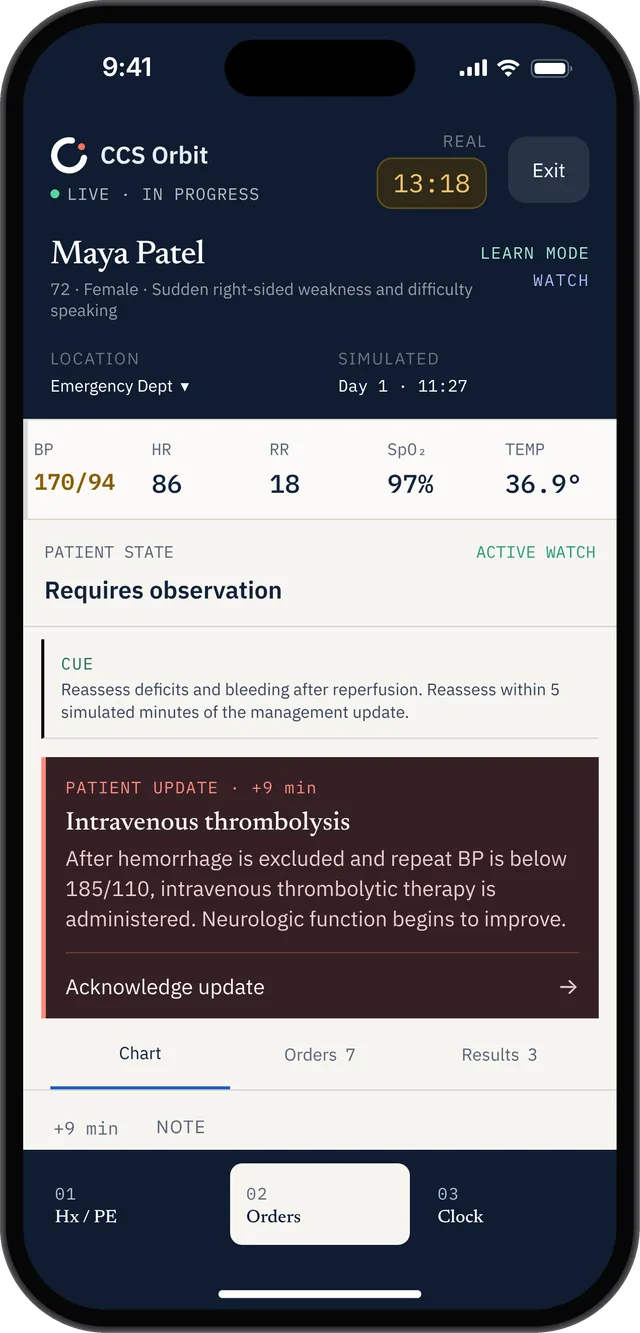
Real time and simulated patient time appear separately as a management update returns.
Frequently asked questions
What is simulated time in Step 3 CCS?
Simulated time is the time experienced by the patient inside the case. It may span minutes, hours, days, weeks or months and is separate from the real-time countdown available to complete the case.
What happens when I advance the clock?
Orders can be processed, results can return, treatment effects can appear and the patient’s condition can change. The case may also stop for a patient update or reach its end.
Does a physical examination advance simulated time?
Yes. The official CCS guidance states that requests for physical examination findings and interval history automatically advance the simulated clock.
Should I use ‘next available result’ every time?
No. It is useful when the earliest pending result can guide care. A chosen interval or scheduled follow-up may be more appropriate when you are assessing a treatment response or managing a longer-term problem.
What if advancing to a follow-up appointment is interrupted?
The official instructions specify that stopping an appointment advance to review processed results cancels that appointment. Review the interruption and schedule another appointment if follow-up is still indicated.
Official sources
USMLE: Computer-based Case Simulations