
When to Advance the Clock in a CCS Case
Advancing the clock is what makes anything happen in a CCS case — and it is also the fastest way to skip past a decision you should have made. Here is how to choose the interval.
There is one control in the CCS interface that does more work than every other button combined, and the USMLE says so plainly: "Advancing the clock is what 'makes things happen.'"
Nothing returns until you move simulated time forward. Test results sit pending. Medications sit unadministered. The patient does not improve, deteriorate, or respond. Candidates who under-use the clock spend their case in a frozen world where they keep ordering things and never learn anything. Candidates who over-use it fast-forward past the moment when a decision mattered.
Both errors show up in feedback the same way — as timing and sequencing problems — but they need opposite fixes. This article is about choosing the interval deliberately.
In this article
- Why nothing happens until you advance
- The two ways to move simulated time
- The question to ask before every advance
- Choosing the interval by clinical situation
- The rule that prevents most sequencing errors
- Interval history and physical exam also move the clock
- Real time versus simulated time
- Building the reflex
- FAQ
Why nothing happens until you advance
The CCS simulation models two clocks. Real time is your exam budget — a maximum of 10 or 20 minutes per case. Simulated time is the patient's clock, which can span, in the USMLE's words, "from a few minutes to several weeks."
Orders you write are requests. They execute in simulated time. Until you move that clock, the chest x-ray you ordered has not been performed, the fluid bolus has not run, and the patient's physiology is exactly where you found it. As the USMLE puts it, you must advance the clock "to see results of tests and procedures, and to observe effects of treatment."
This has an important corollary that beginners consistently miss: you cannot evaluate your own management without advancing. If you order a treatment and never move time forward, you never find out whether it worked, and neither does the record of your case.
The two ways to move simulated time
The interface gives you two distinct mechanisms, and they serve different purposes.
| Method | What it does | When it fits |
|---|---|---|
| With next available result | Advances simulated time to the moment the next ordered item returns | Acute cases where you are actively waiting on something specific — a troponin, an ECG, an imaging study, the response to a bolus |
| A specific time or date | Jumps to a time you nominate (the USMLE's example is a follow-up on "day five at 15:00") | Outpatient and chronic scenarios where the meaningful next event is a scheduled reassessment days or weeks later |
The next result may still be too far away for an unstable patient. Review its expected return time, stabilize urgent threats and choose a shorter reassessment interval whenever needed.
The question to ask before every advance
Before you move the clock, answer one question: what am I waiting for?
If you can name it — "the troponin," "the response to naloxone," "the post-transfusion hemoglobin," "whether the fever settles by day three" — then advancing is the right move, and the thing you named tells you how far to go.
If you cannot name it, you are not waiting. You are stalling, and stalling in CCS is expensive in a way it is not in real life, because the simulation will happily carry you past the window in which an action would have counted as timely.
This single question resolves most clock decisions. A patient with crushing chest pain and an unread ECG has an obvious answer. A patient you have just treated for anaphylaxis has an obvious answer. A patient you have ordered eleven tests for and no treatment does not — and the fact that you cannot name what you are waiting for is the signal that you have skipped a step.
Choosing the interval by clinical situation
The unstable patient. Advance in short steps, or to the next available result. The purpose is to catch deterioration and confirm response before it becomes irreversible. A patient in shock should not be left alone for an hour of simulated time while you wait for a comprehensive metabolic panel. Stabilize, advance a little, look, act again.
Immediately after an intervention. Reassessment is scored, and reassessment requires time to pass. After a bolus, a bronchodilator, an antibiotic, an antidote, or a reduction, advance far enough for the effect to be observable — then actually look at the vitals and repeat the relevant examination or measurement. Treating without checking the result is one of the most common gaps in candidate feedback.
The stabilized inpatient. Once definitive treatment is running and monitoring is in place, intervals of hours are usually appropriate. You are now waiting for a trajectory rather than an event: does the fever curve fall, does the creatinine improve, does the pain settle on the current regimen.
The outpatient or chronic case. Here the meaningful next event is a scheduled visit. Advance to a named day, and make sure the things that should happen in the interval — the medication, the counseling, the referral, the lab to be drawn before the visit — are ordered before you jump. Simulated weeks pass whether or not you remembered the prescription.
A useful discipline for longitudinal cases: before advancing to a follow-up visit, ask what you would want to already be true when the patient walks back in. Then order those things now.
The rule that prevents most sequencing errors
Here is the rule worth memorizing:
Never advance the clock past a decision you have not made.
Sequencing points in CCS are not about doing everything. They are about doing things in a defensible order relative to the patient's condition. Advancing time is the mechanism by which an order becomes "late" or "out of sequence" — the action was reasonable, but it arrived after the moment it would have helped.
In practice this means running a two-second check before each advance:
- Is anything time-critical still unordered? Oxygen, IV access, monitoring, the antidote, the antibiotic, the reperfusion decision.
- Is the patient in the right location for what I have just decided to do?
- Have I ordered the thing whose result I am about to wait for?
That third item sounds absurd until you have watched a candidate advance to "next available result" with nothing pending.
Interval history and physical exam also move the clock
This is a mechanic worth knowing precisely: requests for interval history and physical examination automatically advance the clock in simulated time. The interface indicates how much simulated time a given examination will consume before you commit to it.
Two consequences follow.
First, a physical examination is not free. If you request a full head-to-toe examination on an unstable patient, you have made a time decision as well as a clinical one. Focused examinations are both better medicine and better time management.
Second, examinations are one of the actions locked once the case-end prompt appears. If you want to document that a patient's abdomen has softened or their wheeze has cleared, that examination has to happen during the case, not at the end of it.
Real time versus simulated time
It is worth separating the two clocks in your head, because they reward opposite behaviors.
Advance simulated time deliberately. Clinical deterioration can occur during a time jump, so match the interval to the patient’s condition and the next reassessment needed.
Real time should be spent carefully. Your budget is 10 or 20 minutes per case, and unused time on one case does not carry over to the next. What consumes real time is not advancing the clock — it is hesitation: re-reading the chart, second-guessing an order, hunting through the catalog for a term you have not practiced typing.
That asymmetry is why interface familiarity matters as much as clinical knowledge on this part of the exam. Every second you spend fighting the software is a second not spent managing the patient, and the real-time clock does not care which one you were doing.
Building the reflex
Clock discipline is a motor skill more than an intellectual one. You do not need to understand it better; you need to have done it enough times that the pre-advance check happens without conscious effort.
The most efficient way to build that is high-frequency, low-duration repetition — many short cases rather than occasional long study blocks. A single ten-minute case run properly, with a real clock and an honest look at what was late, teaches more about timing than an hour of reading case write-ups.
Practice the mechanic
Clock decisions you can rehearse on a commute
CCS Orbit puts interactive Step 3 CCS cases on your phone, with the same clock decision at the center of the loop. When you advance, you choose to move to the next available result or by a set interval — and the simulation stops early for clinically important updates, so a deteriorating patient interrupts you rather than waiting politely.
Afterward, the debrief scores six domains — diagnosis, treatment, monitoring, timing, sequencing and location — so a pattern of advancing too far or too early shows up as a measurable trend rather than a vague feeling. The library spans 120+ interactive cases with three free cases at launch.
Three cases are free. Orbit Plus offers a 60-day Exam Pass for US$34.99 or lifetime access for US$59.99. These are the only two paid options. Both are one-time purchases with no automatic renewal or monthly subscription. Regional prices and applicable taxes appear in the App Store purchase sheet. See Orbit Plus options.
Available on the App Store soon. Get one email at launch →
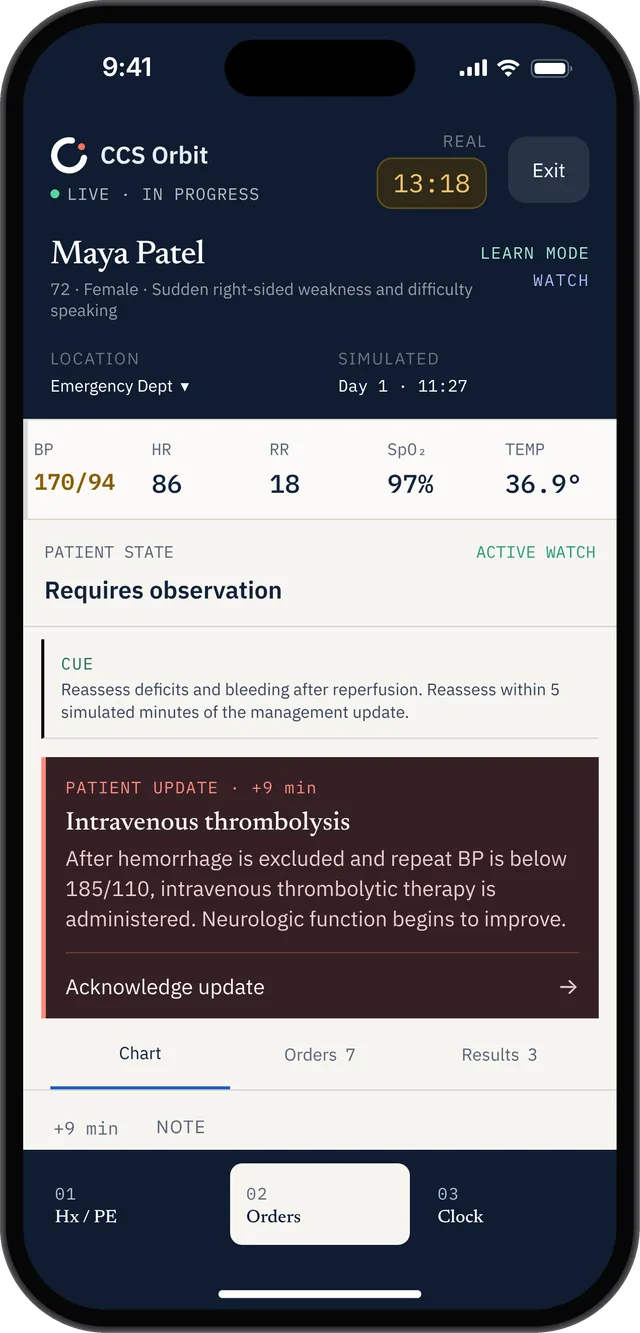
A management update shows why advancing time should lead to a new review of the patient’s response.
FAQ
Does advancing the clock use up my real exam time?
Advancing simulated time is a single interface action and does not consume your real-time budget the way deliberation does. Your real-time limit — a maximum of 10 or 20 minutes per case — runs continuously while you work, so what costs you is hesitation, not the advance itself.
What is the difference between "next available result" and choosing a time?
"With next available result" advances simulated time to the moment your next ordered item returns, which keeps you close to the action in acute cases. Choosing a specific time or date lets you jump to a nominated point — the USMLE's example is scheduling a patient's return on day five at 15:00 — which is how longitudinal outpatient cases are managed.
Can I advance the clock after the case-end screen appears?
No. Once the case-end instructions screen appears, advancing simulated time is no longer available, along with ordering physical exam components, changing the patient's location, scheduling a follow-up appointment, and seeing the results of pending tests. New orders can still be written.
Is it a mistake to advance the clock a long way?
Not inherently — chronic and outpatient scenarios require it. It becomes a mistake when the patient's condition means something important could happen in the interval you skipped, or when an order that should have been placed first arrives after the jump. Match the interval to the patient's stability, not to your impatience.
How do I know if I am advancing too aggressively?
Look for a pattern in your practice feedback: correct actions repeatedly labeled late or out of sequence, missed reassessments after treatment, or deterioration you discovered rather than anticipated. Those cluster together and usually resolve by shortening intervals in unstable patients and running a pre-advance check every time.
Keep reading
Sources
- USMLE, Computer-based Case Simulations — advancing the clock, simulated time, interval history and physical examination.
- USMLE, How to Run a Step 3 CCS Case (video transcript, PDF) — next-available-result versus specific-time advancement.
- USMLE, Common Questions: Step 3 CCS — simulated time range and case-end conditions.
- USMLE, Step 3 Exam Content — Day 2 structure and per-case real-time limits.
Build recall alongside this workflow: search the free CCS mnemonic database, with practical accuracy notes and downloadable PDF and CSV.