
USMLE Step 3 CCS Order Entry Guide
Learn how to enter, sequence, review and cancel orders in USMLE Step 3 CCS, including medications, routes, monitoring and common mistakes.
Order entry is where your clinical plan becomes visible in a Step 3 CCS case. The software does not infer that you wanted cardiac monitoring, intended to begin treatment or planned to repeat a test. If an action matters, you generally need to enter it.
The challenge is not typing as many orders as possible. It is choosing the right orders, placing them in a sensible sequence and advancing simulated time only when the patient is ready.
This guide explains the mechanics of the Primum order sheet and a practical framework for building focused order sets without relying on a universal checklist.
What the CCS order sheet does
The USMLE describes the order sheet as the primary way to implement your patient-management plan. It accepts tests, therapies, procedures, consultations, nursing orders and counseling. Read the official CCS overview.
Orders can be entered at any point in the case, but only from the Order Sheet section of the chart. You cannot place an order while viewing Progress Notes, Vital Signs, Lab Reports, Imaging, Other Tests or the Treatment Record.
That distinction matters under pressure. Use the other chart sections to review information, then return to the order sheet to act on it.
How to enter an order in Primum
| Step | What to do | Key detail |
|---|---|---|
| 1. Open | Go to the Order Sheet. | Orders cannot be entered from other chart sections. |
| 2. Type | Enter one request per line. | Type the clinical item directly. |
| 3. Select | Choose the intended match from the list. | The clerk uses recognized characters to display possible orders. |
| 4. Confirm | Specify available route and administration options. | These choices appear when relevant to the selected order. |
| 5. Review | Check the active order list. | Correct unintended selections before advancing the clock. |
Order recognition: type the item, not a sentence
The order sheet uses free-text entry, but you do not need to write a full instruction such as “administer,” “draw,” “give” or “obtain.” Enter the name of the test, drug, therapy or procedure.
When the clerk recognizes the first three characters of a name or acronym, it displays matching options. If the intended order does not appear, try a different spelling, abbreviation or more specific term rather than repeatedly submitting an unrecognized phrase.
Medication orders must use a specific generic or trade name. Drug classes such as “beta-blocker” or “antacid” are not accepted as medication requests.
Medication routes, timing and doses
The official USMLE questions page provides several software-specific medication rules. Review the official CCS order-entry guidance.
Route: After selecting a medication, choose the appropriate available route during confirmation. Options may include oral, intravenous, intramuscular, subcutaneous, inhaled, topical and others.
Administration: Choose the offered administration type that fits the clinical intent. In Primum, continuous administration also covers appropriate periodic dosing, such as every four hours.
Dose and rate: You do not need to enter medication doses or administration rates; the software assumes they are optimized for the patient’s condition.
PRN orders: Medications cannot be ordered as needed. Order a medication when indicated and cancel it when it is no longer indicated.
Duration: Medication duration is assumed to be optimal.
IV fluids: Primum does not offer intravenous fluids as a One Time/Bolus selection. Choose the available option that represents the indicated fluid therapy.
These are interface rules, not permission to ignore clinical appropriateness. You still need to choose the correct medication, route and point in the case to begin or discontinue it.
Build orders by clinical purpose
A useful way to avoid random order dumping is to assign each order a job.
| Purpose | Question to ask | Examples of the role |
|---|---|---|
| Stabilization | What cannot safely wait? | Immediate supportive care or a time-critical intervention. |
| Monitoring | How will I detect change? | Appropriate vital-sign frequency, cardiac monitoring or pulse oximetry. |
| Diagnosis | Which result could change care? | Focused laboratory, imaging or bedside testing. |
| Treatment | What should begin now? | Definitive or empiric therapy supported by the presentation. |
| Procedure or consultation | Is another intervention or service indicated? | A necessary procedure or appropriately timed specialist input. |
| Ongoing care | What remains after stabilization? | Medication continuation, prevention, counseling and follow-up. |
Not every case needs an order in every category. The point is to identify why an order belongs—not to complete a template.
Sequence orders around patient risk
The USMLE states that timing and sequencing contribute to the evaluation, and that a correct action performed in the wrong sequence or after a simulated-time delay may receive no credit.
For a stable patient, it may be reasonable to examine, enter a focused diagnostic and treatment batch, then advance to a useful result or reassessment point. For an unstable patient, urgent treatment and monitoring may need to come before a complete examination or confirmatory testing.
Use this order-entry sequence as a decision framework:
- Address immediate threats and begin time-critical treatment.
- Activate monitoring appropriate to the patient’s risk.
- Order focused tests that can clarify the diagnosis or guide the next action.
- Add other indicated treatment, procedures and location decisions.
- Review the entire order sheet before advancing simulated time.
Do not delay a necessary intervention merely to finish a familiar laboratory bundle. Equally, do not apply emergency orders to a stable outpatient simply because they appear on a memorized list.
Review orders before advancing the clock
Advancing simulated time implements orders, initiates therapies and allows results to return. Once time has moved forward, you cannot undo what has already happened.
Before every clock advance, check:
- Have I entered the treatment that should start now?
- Is appropriate monitoring active?
- Is the route or administration option correct?
- Did I accidentally select the wrong item from the recognition list?
- Are any existing or newly entered orders inappropriate?
- Is the patient in a safe location for the planned interval?
- What result or response am I advancing to see?
This brief review is especially valuable when several similarly named options appeared during order recognition.
Canceling and discontinuing orders
Select an active order and confirm the cancellation to discontinue a therapy or cancel a test or procedure.
Timing changes what cancellation means:
Before the clock advances: An unprocessed order can be removed before it is carried out.
Before a result returns: Canceling a diagnostic test or procedure means it has not been completed.
After a result is seen: The diagnostic action has already occurred and cannot be canceled retroactively.
For an active therapy: Cancel the medication, IV fluid or treatment when it is no longer indicated; cancellation removes it from the active order sheet.
The software also treats stopping a medication as the way to taper it. There is no separate tapering schedule to enter.
Do not ignore orders already on the chart
Some cases begin with an existing medication or another active order displayed at Day 1 @00:00. These orders remain active unless you cancel them.
Review each one against the patient’s current condition. Continuing an inappropriate medication by inattention is still a management decision; so is stopping a necessary chronic therapy without a reason.
Consultations are not a substitute for management
Consultation may be appropriate, but the official guidance notes that consultants are typically not helpful because CCS is designed to assess your management. You may need to act before a consultant is available, and some referrals make more sense only after you have gathered enough information to justify them.
If an intervention is already indicated, do not wait for a consultant to enter the treatment and monitoring orders that remain your responsibility.
Counseling, prevention and follow-up orders
The order sheet is also how you document patient education and counseling. Enter these items when they are relevant to the case rather than adding the same generic list to every patient.
Once the acute problem is controlled, consider whether the patient needs:
- Condition-specific education or risk-factor counseling
- Medication continuation or discontinuation
- Appropriate screening or preventive care
- A follow-up appointment or repeat investigation
- A safe final location and disposition
The official guidance cautions that many routine counseling, diet and ambulation orders carry little or no scoring weight unless they are particularly relevant. Clinical relevance is more useful than volume.
Common Step 3 CCS order-entry mistakes
Typing drug classes: The clerk requires a specific generic or trade medication name.
Writing full command sentences: Extra verbs are unnecessary and may make recognition less efficient.
Ordering everything at once: A large unfocused list can include unnecessary or harmful actions and obscure what matters.
Forgetting treatment while ordering tests: Diagnostic work should not delay a time-critical intervention.
Leaving monitoring implicit: Do not assume the healthcare team will independently add orders such as cardiac monitoring or pulse oximetry.
Advancing without reviewing: Once simulated time advances, therapies begin and completed actions cannot be undone.
Keeping obsolete therapies active: Cancel medications and treatments when they are no longer indicated.
Ignoring pre-existing orders: Orders visible at the start remain active unless you cancel them.
Using consultation as a handoff: You remain responsible for the patient’s management decisions.
A practical order-entry drill
During practice, pause immediately before the first clock advance and classify every active order: stabilization, monitoring, diagnosis, treatment, procedure/consultation or ongoing care.
Then ask three questions:
- Which order must happen before time moves?
- Which order is unlikely to change management or may be inappropriate?
- What information or treatment response will determine my next order batch?
Use the official interactive CCS cases to learn the recognition list, confirmation options and cancellation behavior before test day. Open the official Step 3 practice resources.
Practice order entry with CCS Orbit
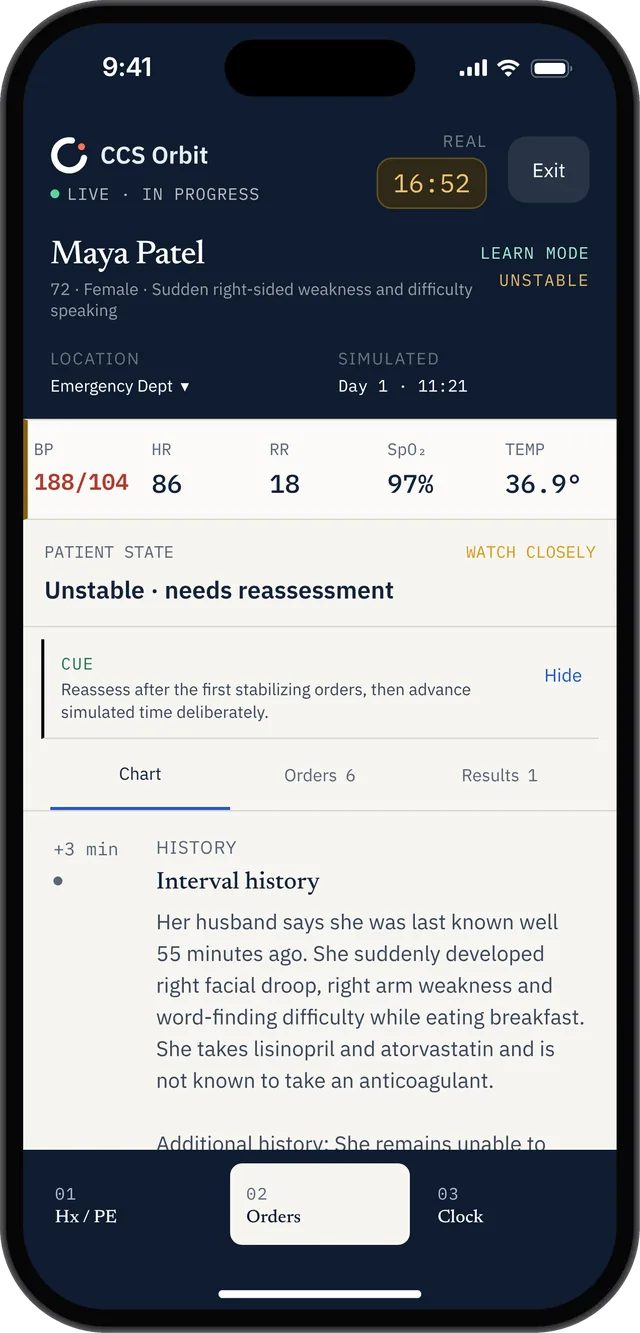
Review the patient’s state and access Orders during a full case. This is Orbit’s mobile practice view.
Frequently asked questions
Where do I enter orders in Step 3 CCS?
Orders can be entered only in the Order Sheet section of the patient chart, one request per line.
Do I need to type complete commands?
No. Enter the name of the test, therapy, procedure or counseling item. Words such as “give,” “administer” and “obtain” are unnecessary.
Do I need to enter medication doses?
No. The Primum software assumes medication doses and administration rates are optimized, but you must select the appropriate drug, route and administration type.
Can I order a medication PRN?
No. Order the medication when it is indicated and cancel it when it is no longer indicated.
Can I cancel an order after entering it?
Yes, but you cannot undo an action that has already occurred. A test or procedure cannot be canceled after its result has been seen.
Should I use the same initial order set for every case?
No. Build orders around the patient’s stability, presentation, location and the decisions that must be made next.
Official sources
USMLE: Computer-based Case Simulations