
Why Did My CCS Case End Early? What It Means—and What It Doesn’t
An early CCS ending is not a score report. Understand the transition, make useful final decisions and learn more from your practice feedback.
You have time left. You have more things you could order. Then the case-end screen appears.
If your CCS case ended early, the immediate question is usually the same: Did I do well, or did I miss something important?
An early ending does not, by itself, tell you whether you performed well or poorly. USMLE explains that a case can finish after its measurement objectives have been met, but it can also finish early when appropriate intervention has not occurred and simulated time keeps advancing.[1]
The useful response is to focus on what you can still control: completing the closing stage thoughtfully and, during practice, reviewing the decisions behind the ending.
Why can a Step 3 CCS case end before time runs out?
The time shown at the beginning is a maximum, not a target you must fill. USMLE states that cases finish under different circumstances and after different amounts of real and simulated time. Reaching the case-end instructions sooner than expected is not necessarily evidence that you did something right or wrong.[2]
That distinction matters because students often develop rules from a few memorable practice attempts:
- “My good cases always end quickly.”
- “If it keeps running, I must be missing an order.”
- “If I get the ending screen, I have completed everything.”
These are interpretations, not dependable ways to assess performance. They also encourage an unhelpful goal: trying to make the software end the case instead of managing the patient in front of you.
Think of the ending as a transition in the task—not a hidden congratulations message or a failure notification.
Understand real time and simulated time
Real time is the time you spend completing the exercise. Simulated time represents the patient's clinical course. Advancing simulated time allows results and treatment effects to appear; if no results are pending, advancing can move to a patient update or the case ending.[2]
For practice, this suggests a simple habit: before advancing, say what you are waiting for.
Are you expecting an investigation result? Checking the response to treatment? Planning the next appropriate review? If you cannot name the purpose, pause and inspect your current plan.
This does not mean avoiding the clock. It means using it deliberately. Our guide to simulated time in CCS explains how to make that part of your workflow.
What can you do when the case-end screen appears?
The case-end stage has different controls from the active case. According to USMLE, you can review information already in the chart, add orders and cancel orders. You cannot obtain a new examination or interval history, change location, receive pending results, schedule a follow-up appointment or advance simulated time.[1]
Read the on-screen instructions and work within those limits. Here is a suggested closing routine—not a universal scoring checklist:
1. Review the plan you have actually entered
Do not confuse the plan in your head with the orders on the screen. Check whether the relevant decisions you intended to enter are present.
This is a focused review, not an invitation to reread every normal result. Ask: Does the documented plan make sense for this patient at this stage?
2. Look for orders that no longer belong
Consider whether any active or pending order should be canceled in light of the information already available. Do not assume an early ending makes the existing plan complete or internally consistent.
3. Add relevant remaining orders
Use the patient's needs to guide final actions. A memorized bundle of tests, counseling and preventive measures is not a substitute for deciding what belongs in this particular case.
For more detail, see what to do in the final two minutes of a CCS case.
Three reactions that make early endings more stressful
Trying to reverse-engineer your score
After an unexpected ending, it is tempting to replay every click and decide what the timing “must” mean. The problem is that the ending itself does not give you enough information to reach that conclusion.
During practice, save that energy for the explanation. During the exam, finish the current task and reset before the next patient.
Adding orders just to feel more complete
More activity is not automatically better management. Official assessment considers indicated actions, their timing and sequence, and actions that are not indicated or potentially harmful.[3]
Before adding a final order, ask: What problem am I addressing, and why is this relevant now? If the answer is only “I still have time,” reconsider it.
Treating a practice platform’s ending as an official result
Commercial simulators have their own case logic and feedback systems. A familiar pattern in one resource is not a reliable decoder for the real examination.
Use practice to develop decisions you can explain, rather than learning how to trigger a particular ending.
How to review a practice case that ended early
The most useful question is not “Was it fast?” It is “What should I repeat or change next time?”
Try this short review:
| Review question | What to write down |
|---|---|
| What was the main problem I needed to address? | One sentence describing the management priority. |
| What important decision did I miss or delay? | The action and the cue that should have prompted it. |
| Did I evaluate what happened after acting? | The response I checked—or should have checked. |
| What was incomplete before the closing stage? | One decision to make earlier next time. |
| What will I practice again? | One specific habit, not “do better.” |
For example, your review might be: “I entered the initial management plan but moved on without deciding how to reassess the response.” That is more actionable than “The case ended strangely.”
Repeat the case after a gap, then test the same habit in a different presentation. Remembering one case's answer is useful, but transferring the habit is the more meaningful goal.
How CCS Orbit makes that review easier
CCS Orbit brings the management-and-review loop to iPhone: enter orders, advance simulated time, reassess the patient, then examine the decisions behind your attempt. Six-domain debriefs and case history help you revisit missed or delayed actions. The Decision Profile and Error Log make recurring patterns easier to identify.[4]
That is particularly useful when an ending leaves you uncertain. Instead of using the case length as your feedback, you have a structured place to examine the attempt. Final two-minute practice also gives you a way to rehearse the closing stage itself.[4]
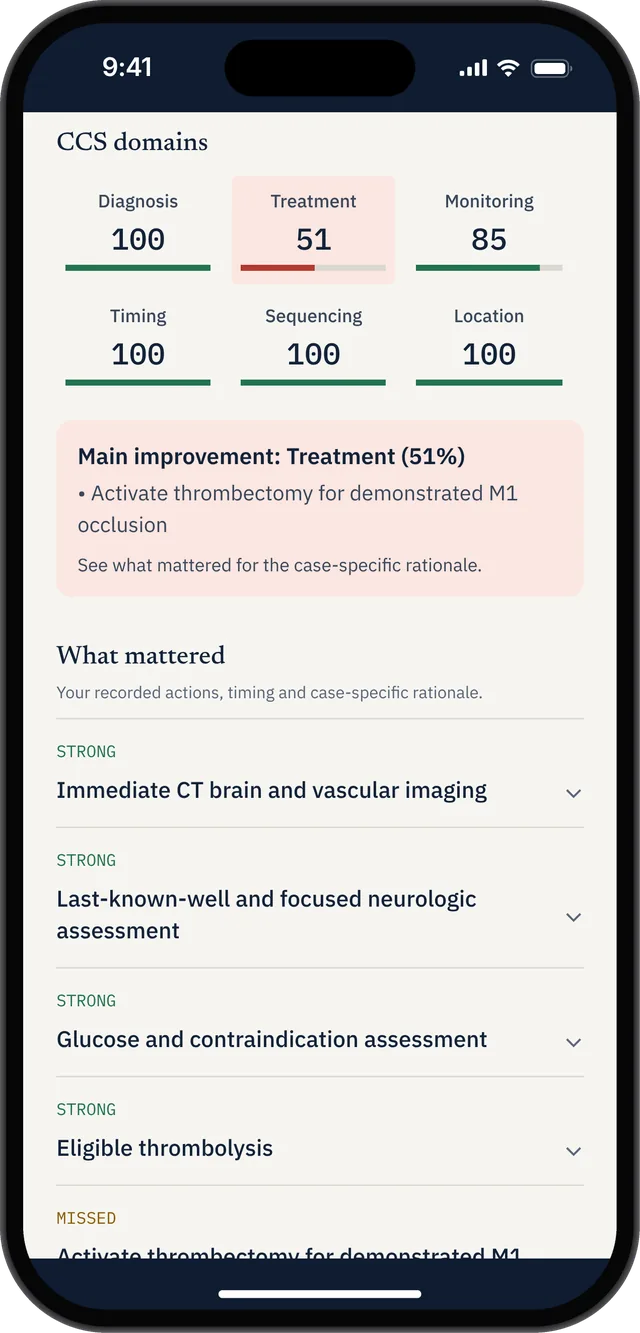
Orbit is an independent educational simulator, not the official USMLE software, and its practice scores do not predict your exam result. Use the official CCS resources alongside your case practice to learn the examination interface.
Focused CCS preparation with a clear cost
CCS Orbit's launch offering includes three free cases. Orbit Plus provides the complete 120+ case library through a US$34.99 one-time 60-day Exam Pass or US$59.99 lifetime access. Neither option automatically renews; regional prices and taxes appear at purchase.[4]
The cost benefit is straightforward: you can choose a defined study window without a recurring payment to cancel after your exam. If you already have broader Step 3 resources, that gives you a focused CCS option with a known price—a one-time purchase with no automatic renewal.
CCS Orbit is coming soon to the App Store. Explore the app and sign up for its launch notice.
Frequently asked questions
Does a CCS case ending early mean I passed?
No. An early ending alone is insufficient to judge case performance, and it cannot establish your overall Step 3 result. Use the remaining stage appropriately rather than treating its timing as a score report.[1,2]
Should I keep ordering until the timer runs out?
Do not add orders merely to occupy the remaining time. Review your plan and enter actions that are relevant to the patient. The aim is appropriate management, not the longest possible order list.
What if I was not finished when the ending appeared?
Follow the displayed instructions and use the actions still available. In practice, review which decisions could have been made earlier and rehearse that sequence on a later attempt.
How should I practice case endings?
Learn the controls in the official software, then use a consistent closing routine during case practice. Review existing orders, consider relevant changes and explain why each final action belongs.
The takeaway
A CCS case ending early is not a verdict. Your preparation is better served by understanding the transition, practicing a calm final review and learning from the decisions behind each attempt.
Do not train to make cases end quickly. Train to make your next decision more deliberate.
Sources
- USMLE: Common Questions—CCS case length and case-end actions.
- USMLE: Computer-based Case Simulations.
- USMLE: Step 3 Formats & Questions—Evaluative Objectives and Assessment.
- CCS Orbit: Features, pricing and availability. Checked October 13, 2026.
CCS Orbit is an independent educational resource and is not affiliated with USMLE, NBME or FSMB. Study suggestions are not an official scoring checklist or a guarantee of performance.