
A 2-Week Step 3 CCS Study Plan: What to Practice Each Day
A practical 14-day CCS schedule that balances new cases, deliberate review and official software practice—without turning case count into the goal.
A useful 2-week Step 3 CCS study plan needs more than a daily case target. It needs time to learn the software, work through different presentations and fix the habits that keep costing you in practice.
This 14-day schedule is designed for focused CCS preparation alongside your broader Step 3 study. It combines official software practice, new cases, repeat attempts and short feedback reviews. Most days allow around 60–90 minutes, with a lighter version for busy workdays.
Two weeks is a planning window—not a promise of readiness. If you are new to CCS, have major clinical knowledge gaps or can rarely complete a study session, start earlier or extend the schedule.
What you should be able to do by the end
Use these practical goals to guide the fortnight:
- Start a case with a patient-specific plan rather than a memorized order bundle.
- Enter orders and use the official software without repeatedly searching for basic controls.
- Advance simulated time for a clear reason.
- Reassess after acting and adjust your plan when new information arrives.
- Explain the important omissions or delays identified in a practice debrief.
- Complete the closing stage without a rushed, indiscriminate burst of orders.
These are study goals, not a validated pass/fail checklist. If one remains consistently difficult, give it more practice rather than simply declaring the schedule complete.
Set up a small, affordable study toolkit
Start with the official CCS software
USMLE recommends practicing with its CCS software before the examination and warns that unfamiliarity with the format and mechanics can be a disadvantage. Use the official resources to learn the actual controls, even if most of your clinical practice happens in another resource.[1]
The official interactive testing experience includes six CCS practice cases with case-related feedback.[2] Build these into the schedule deliberately; do not save your first exposure to the software for the night before testing.
Choose one main resource for repeated case practice
Pick a resource you can realistically use most days. A larger library is only valuable if you make time to review what happens in it.
CCS Orbit is built for iPhone, with 120+ cases at launch, Learn and Exam modes, and cases and debriefs that work offline. Save and resume helps you continue an interrupted practice session. Its Decision Profile, Error Log and Focus Mode support targeted review across attempts.[3]
That makes it a practical fit for a schedule split between longer study sessions and short gaps in the day. Use guided practice to work on your approach, then remove the in-case teaching cues when you want a more independent attempt. Keep returning to the official software for interface familiarity.
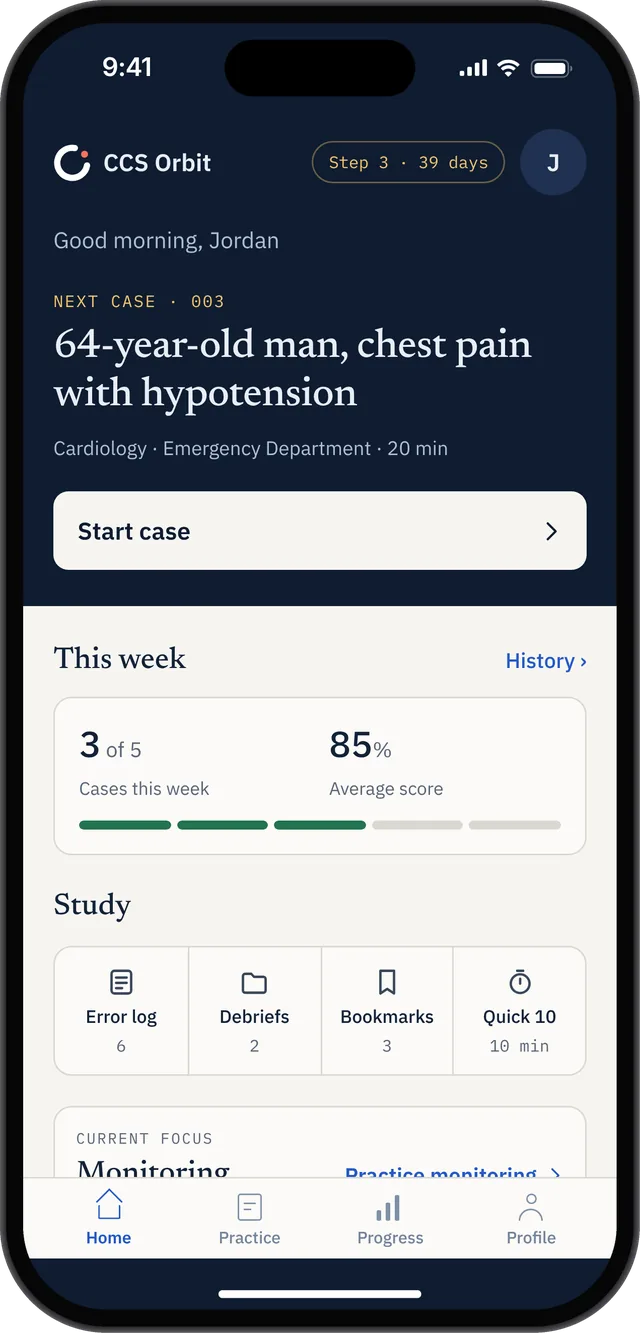
Home shows a next-case preview, weekly target and review shortcuts to support regular practice.
Give feedback a home
Use the app's review tools or a simple note containing three fields:
- What I missed or delayed.
- What should have triggered the decision.
- What I will do differently next time.
Keep entries short enough to reread. A growing collection of copied explanations is less useful than a small set of habits you actively test.
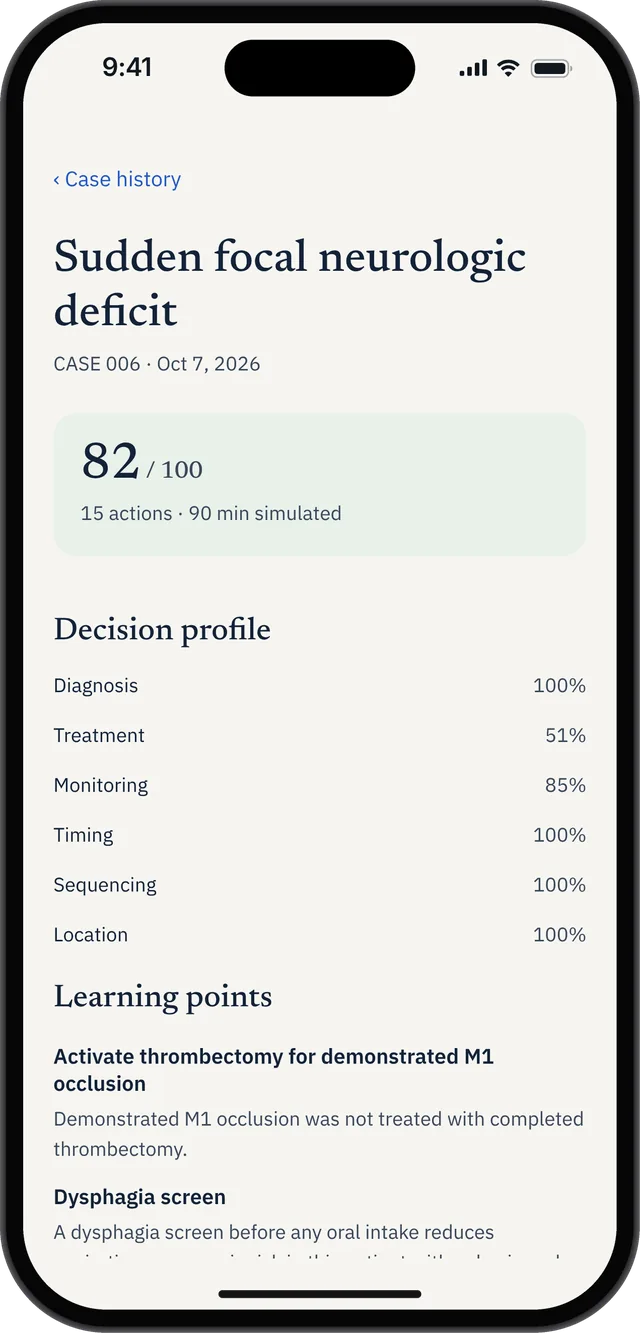
Saved case history keeps the domain breakdown and specific learning points available for a later review.
The 14-day CCS study schedule
The case targets below are suggested workloads, not a required number for passing. “Cases” includes repeat attempts where specified. Choose presentations available in your resource; the themes organize your practice and are not predictions of your exam content.
| Day | Focus | Suggested workload | Review task |
|---|---|---|---|
| 1 | Learn the official interface | Tutorial and 1 official case | Practice finding orders, results, location and clock controls. |
| 2 | Build an opening routine | 2 new cases | Explain the first management priorities before checking feedback. |
| 3 | Acute presentations | 2–3 new cases | Identify where urgency changed your sequence. |
| 4 | Results and reassessment | 2 new cases + 1 repeat | Write what you expected to learn after advancing time. |
| 5 | Outpatient management | 2–3 new cases | Review follow-up planning and patient-specific ongoing care. |
| 6 | Broaden your coverage | 2–3 new cases | Choose presentations unlike those you have already practiced. |
| 7 | Midpoint repair session | 2 repeats + 1 official case | Identify your two most persistent workflow problems. |
| 8 | Target the weakest skill | 2–3 selected cases | Test one correction across different presentations. |
| 9 | Care setting and progression | 2–3 cases | Explain location decisions and how your plan changes over time. |
| 10 | Closing-stage practice | 2 cases + brief ending drills | Review final orders for relevance, not quantity. |
| 11 | Independent timed practice | 3 mixed cases | Complete attempts without checking explanations midway. |
| 12 | Return to official software | 2 official cases | Separate interface mistakes from management mistakes. |
| 13 | Mixed rehearsal | 2 official cases + 1 selected repeat | Check whether your recurring problems are improving. |
| 14 | Light consolidation | Review notes; 0–1 short repeat if useful | Rehearse your workflow and stop adding unnecessary new material. |
This schedule produces roughly 29–35 attempts, including repeats and the six official cases. It is an organizational target, not an evidence-based minimum. If a difficult case needs a longer review, reduce the volume that day.
For the broader question of volume versus readiness, see how many CCS cases to do before Step 3.
Week 1: Build a workflow you can explain
The first week should make your practice more deliberate, not merely faster.
On each new case, ask yourself:
- What is the immediate management problem?
- Which information could change what I do next?
- What response will I reassess after acting?
- What would make me change the plan?
You do not need to narrate the whole case aloud. A brief pause at important transitions can reveal when you are clicking from habit rather than making a decision.
Afterward, review the explanation before opening another patient. Separate a knowledge gap from a workflow error. Forgetting an indication may require focused reading; recognizing the indication but acting too late calls for a different sequence on the next attempt.
CCS Orbit's six-domain debriefs connect feedback to the management decisions made during a case.[3] Use that detail to choose a specific next goal. “Reassess after the first intervention” is easier to practice than “Get a higher score.”
Our Step 3 CCS scoring guide explains how to think about the decisions behind practice feedback.
Week 2: Test whether the improvement transfers
A repeat attempt can show whether you remember a correction. A different case helps you test whether you can recognize when to apply it.
Use both. If your recurring issue is incomplete reassessment, repeat one case where it happened, then attempt a different presentation while applying the same habit.
As the week progresses, do more independent attempts. In CCS Orbit, Exam mode removes the in-case teaching cues available in Learn mode.[3] Treat it as an opportunity to discover what you can initiate without prompting—not as a predictor of an official score.
Keep explanations closed during timed practice. Then spend the review time on decisions that were uncertain, delayed or missing. Do not reserve review only for low-scoring attempts; a comfortable case may still expose an assumption worth checking.
A daily session that does not neglect the debrief
Here is one way to structure a 75-minute session:
- 5 minutes: Revisit yesterday's two most useful notes.
- 40 minutes: Work through two cases, adjusting for their length.
- 20 minutes: Review the decisions and explanations.
- 10 minutes: Rehearse one weak section or make a short plan for the next session.
This is a suggested allocation, not a rigid timer. If a case exposes an unfamiliar concept, spend the remaining session resolving it. Finishing fewer cases with a clearer understanding is preferable to meeting a number while leaving the same problem untouched.
How to adapt the plan around busy workdays
On a day when 60–90 minutes is unrealistic, use a minimum session:
- Review one previous mistake.
- Complete one short case, resume a saved attempt or rehearse one section.
- Record one lesson to apply next time.
Move the longer timed session to a day when you can give it sustained attention. Avoid repeatedly doubling the next day's workload to “catch up.” That can turn a manageable plan into a cycle of rushed cases and skipped reviews.
The practical advantage of iPhone practice is access: you can use a suitable quiet break without setting up a desktop session. Offline cases and save-and-resume make CCS Orbit useful when your study time is fragmented.[3] Reserve uninterrupted sessions for timed rehearsal, and do not let convenience replace official interface practice.
What does this study plan cost?
You can start with free official practice resources. If you want additional cases, CCS Orbit's launch pricing offers a clear choice:[3]
| CCS Orbit option | Price in US dollars | Best fit |
|---|---|---|
| Three free cases | $0 | Explore the case experience and debrief before purchasing. |
| Orbit Plus Exam Pass | $34.99 once for 60 days | A defined preparation period without automatic renewal. |
| Orbit Plus Lifetime | $59.99 once | Access without expiry, including when your study timeline changes. |
For a two-week plan entirely within its access window, the Exam Pass is the lower-cost paid option. Lifetime costs $25 more and removes the expiry date. Both paid options unlock the complete library; neither creates a recurring subscription payment.[3]
That is a useful budgeting benefit during Step 3 preparation: you know the purchase cost and do not need to remember to cancel after testing. Regional pricing and applicable taxes appear in the App Store purchase sheet.
Orbit’s mobile access and review tools make it easy to use this plan around other commitments. Start with three complete free cases at launch, then choose the Exam Pass if you want the full 120+ case library for a focused preparation window.
How to judge whether you need more time
At the end of the fortnight, review the pattern across recent attempts—not just your best score.
Can you use the official controls comfortably? Can you explain why you chose your next action? Are the same omissions recurring less often? Can you complete a mixed case without relying on teaching cues?
If the answers are inconsistent, identify the biggest gap and extend the relevant part of the schedule. Completing 14 calendar days does not, on its own, establish readiness.
Frequently asked questions
Is two weeks enough for Step 3 CCS?
It depends on your starting point and available study time. Two weeks can provide a focused structure, but someone learning the interface and clinical approach from scratch may need longer. Use the schedule to organize practice, not to guarantee a result.
How many CCS cases should I do each day?
This plan generally uses two or three attempts on practice days, with lighter review days and dedicated official-software sessions. Reduce the number when a debrief reveals something that needs more work.
Can I prepare for CCS on my phone?
A phone can be useful for repeated management practice and review. CCS Orbit is designed for that role on iPhone. You should also practice with the official USMLE software so you are familiar with the examination interface.[1,3]
Should I finish all 120+ CCS Orbit cases in two weeks?
That is not the goal of this schedule. Select varied cases, revisit consequential mistakes and test improvement across new presentations. The library gives you choice; it is not a completion requirement.
Start with a plan you can sustain
A strong CCS study routine is a loop: attempt a case, identify a useful lesson, practice the correction and test it again elsewhere.
CCS Orbit is coming soon to the App Store. Explore the app, compare access options and get notified at launch. In the meantime, begin with the official software and use the schedule with the resources you already have.
Sources
- USMLE: Computer-based Case Simulations—preparation and software familiarity.
- USMLE: Common Questions—official CCS practice cases and feedback.
- CCS Orbit: Features, pricing and availability. Checked October 13, 2026.
This schedule is an editorial study framework, not a validated preparation protocol. CCS Orbit is an independent educational resource and is not affiliated with USMLE, NBME or FSMB. Its practice scores do not predict official examination results.