
How to Approach USMLE Step 3 CCS Cases
Learn a repeatable approach to USMLE Step 3 CCS cases, including initial assessment, order entry, simulated time, reassessment and disposition.
Step 3 CCS cases can feel awkward at first. You may recognize the diagnosis quickly, yet still lose control of the case because the orders were entered in the wrong sequence, simulated time was advanced too far or the patient was left in the wrong setting.
The solution is not one enormous order set. It is a repeatable process that helps you decide what matters now, what can wait and what information should change your next move.
This guide provides that process. It is not a secret scoring formula, and it cannot replace clinical judgment. Think of it as a framework for turning your medical knowledge into clear actions inside the CCS software.
What are Step 3 CCS cases testing?
The USMLE describes Computer-based Case Simulations as dynamic patient-care scenarios that evaluate an examinee’s approach to diagnosis, treatment and monitoring. The patient may improve, deteriorate or otherwise change as simulated time passes in response to the underlying condition, your management or both. Read the official CCS overview.
In practical terms, you are being asked to manage one patient over time. That requires more than naming the disease. You must decide:
- Whether the patient is stable
- Which actions are urgent
- What examination is appropriate
- Which tests, treatments and monitoring orders are indicated
- When to advance simulated time
- How to respond to results and patient updates
- Where the patient should receive care
- What ongoing treatment, counseling or follow-up is needed
Step 3 currently includes 13–14 CCS cases on Day 2, with a maximum of either 10 or 20 minutes of real time for each case. See the current Step 3 exam format.
The eight-step CCS approach
Use the same broad sequence whenever a case begins. The details will change, but the questions you ask yourself should remain consistent.
| Step | Question to ask | Action |
|---|---|---|
| 1. Orient | What is happening? | Identify the setting, vital signs, tempo and main problem. |
| 2. Stabilize | Is there an immediate threat? | Treat urgent airway, breathing or circulatory problems without waiting for a complete workup. |
| 3. Examine | What examination will change care? | Request an appropriate focused or complete examination. |
| 4. Order | What does the patient need now? | Enter a focused batch of diagnostic, treatment and monitoring orders. |
| 5. Advance | What am I waiting for? | Move simulated time to the next useful result or reassessment point. |
| 6. Reassess | Did the patient respond? | Review results, interval history and relevant examination findings. |
| 7. Locate | Where should care continue? | Move the patient to the office, ED, ward, ICU or home when appropriate. |
| 8. Close | What remains unfinished? | Complete ongoing therapy, disposition, counseling and follow-up. |
Step 1: Orient yourself before entering orders
Begin with the information already visible. Note the patient’s age, presenting location, appearance, vital signs, history and the apparent pace of the illness.
Before typing, ask five quick questions:
- Is the patient stable or unstable?
- What is the most dangerous plausible problem?
- Does anything need to happen before an examination or diagnostic test?
- What setting is the patient currently in?
- Which one or two diagnoses best explain the presentation?
You do not need a perfect differential before acting. You need enough orientation to avoid delaying an urgent intervention or sending the case down an unfocused path.
Step 2: Stabilize immediate threats first
If the patient appears unstable, address time-critical problems before building an exhaustive diagnostic list. The CCS software allows you to enter orders before requesting a physical examination when that is what appropriate patient care requires.
Your initial priorities should match the presentation. Depending on the case, that may include appropriate monitoring, vascular access, oxygen or ventilatory support, fluids, medications or another urgent intervention. Do not turn this into an automatic order bundle: an action that is useful for one unstable patient may be unnecessary or harmful for another.
A useful test is simple: if waiting for the complete examination or a confirmatory result could materially harm this patient, consider whether treatment should begin now.
Step 3: Perform an examination with a purpose
Physical examination requests automatically advance simulated time. That does not mean you should avoid examining patients. It means the examination should be chosen deliberately.
A focused examination is often efficient when the likely problem and relevant systems are clear. A broader examination may be appropriate when the presentation is vague, several systems could be involved or important findings would change the differential.
Ask yourself what you expect the examination to clarify. If you cannot explain how a component relates to the presentation, it may not belong in the first pass.
Step 4: Enter orders in focused batches
The order sheet is where you implement the management plan. It accepts free-text entries for tests, treatments, procedures, nursing orders, consultations and patient counseling.
For each initial order, decide which of four jobs it performs:
- Stabilizes or treats the patient
- Monitors an important risk or response
- Confirms or excludes a meaningful diagnosis
- Supports the next decision about location, disposition or follow-up
This keeps the first order batch purposeful. Avoid entering everything you can remember simply because the software permits it. Excessive orders consume attention, make the chart harder to interpret and may expose the patient to unnecessary interventions.
Also review any orders already active at the start of the case. The official guidance notes that pre-existing orders remain active unless you cancel them, so decide whether they are still appropriate.
Step 5: Advance simulated time deliberately
Advancing the clock is what allows orders to be processed, results to return and the effects of treatment to become visible. It is also one of the easiest places to lose control of a case.
Before every time jump, ask:
- What result or clinical change am I waiting for?
- How long is it safe to wait?
- Should the patient be monitored or treated during that interval?
- Will I need to reassess before advancing further?
When appropriate, advancing to the next available result is often more controlled than jumping forward by an arbitrary large interval. A stable outpatient awaiting follow-up may require a much longer simulated interval than a deteriorating patient in the emergency department.
Step 6: Reassess instead of assuming
A correct initial plan is not the end of the case. Review returned results, repeat relevant observations and request an interval history or examination when it would meaningfully assess the patient’s response.
Look for three things:
- Did the working diagnosis become more or less likely?
- Did treatment produce the intended response?
- Did the patient develop a new problem or require escalation?
If the patient is not improving, do not keep advancing the clock and hoping for a different outcome. Reconsider the diagnosis, the adequacy of treatment, missing monitoring and whether the current location is appropriate.
Step 7: Put the patient in the correct location
CCS patients may be managed at home, in an office, in the emergency department, on an inpatient unit or in intensive care. Location is part of the management decision, not merely a label at the top of the screen.
Ask whether the current setting can safely provide the monitoring, treatment and speed of response the patient needs. A patient who requires continuous monitoring or urgent intervention should not remain in a routine office setting. Likewise, a stable patient should not automatically be escalated to intensive care without an indication.
The official software prevents location changes after the Case-end Instructions screen appears, so disposition should not be left until the last possible moment.
Step 8: Close the case safely
Once the acute problem is controlled, shift from rescue to completion. Review whether the patient still needs ongoing medication, monitoring, preventive care, counseling, specialist input or follow-up.
When the Case-end Instructions screen appears, you can still review the chart, cancel orders and add certain new orders. You can no longer request physical examination components, change location, arrange a follow-up appointment or see pending results. Reaching this screen early does not, by itself, prove that the case went well or badly.
If you believe management is complete but the case has not ended, the official guidance advises receiving pending results and then advancing simulated time until the case concludes.
Common CCS approach mistakes
Delaying urgent treatment: Waiting for every diagnostic result before treating a time-critical problem.
Using the same order set for every patient: Ignoring the presentation, setting and individual risks.
Advancing time without a reason: Moving the clock forward without knowing what result or change you expect.
Forgetting to reassess: Ordering treatment but never checking whether it worked.
Ignoring location: Leaving a patient in a setting that cannot safely deliver the required care.
Relying on a consultant to manage the case: The USMLE notes that you may need to act before a consultant is available.
Panicking when a case ends early: The Case-end screen does not necessarily indicate success or failure.
Forgetting the longer-term plan: Missing ongoing therapy, counseling, preventive measures or follow-up after the immediate problem improves.
How to practice this framework
Read the framework once, then apply it during actual simulations. After each case, review the process rather than focusing only on the final diagnosis.
Ask yourself:
- Did I recognize instability early?
- Were my first orders focused and appropriately sequenced?
- Did I know why I was advancing simulated time?
- Did I respond to results and reassess the patient?
- Was the location and final disposition appropriate?
- What unnecessary, delayed or missing action should I change next time?
The USMLE recommends becoming familiar with both the CCS interface and its case-management mechanics before test day. Begin with the official interactive materials, then use repeated practice to make the sequence feel automatic. Open the official Step 3 practice resources.
Practice the CCS workflow with CCS Orbit
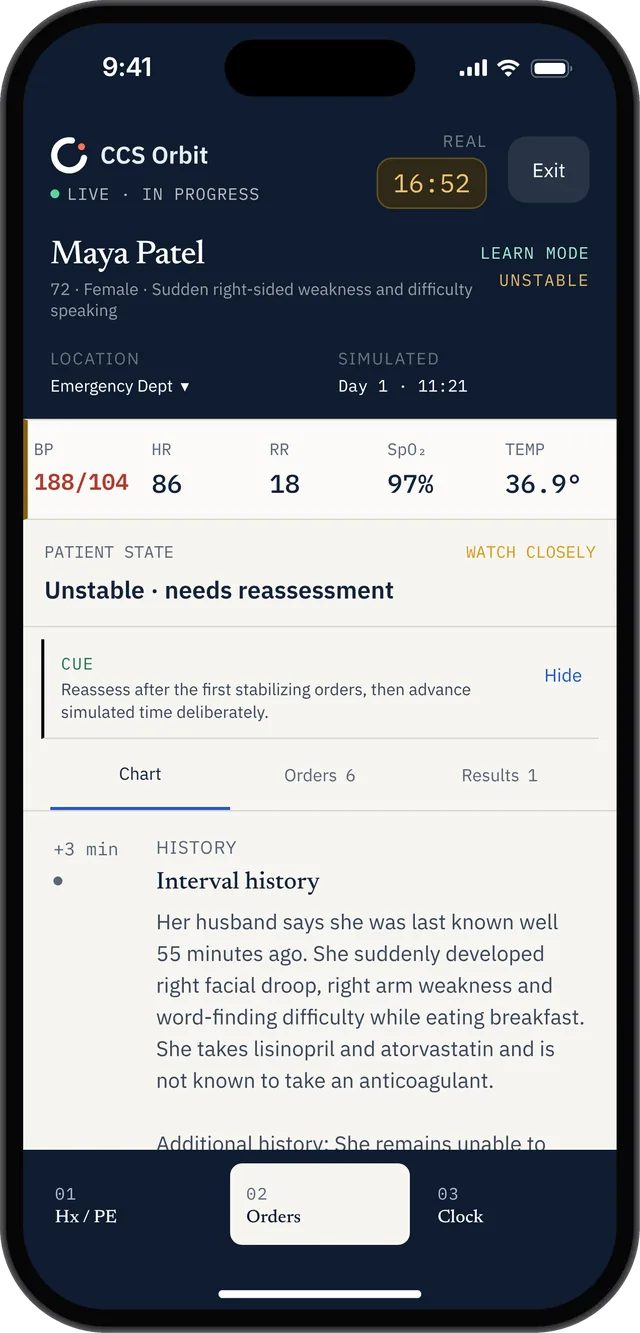
The case view brings together the patient state, vital signs, timeline and a Learn mode cue.
Frequently asked questions
What should I do first in a Step 3 CCS case?
Start by assessing the setting, vital signs, appearance and stability. If an urgent threat is apparent, immediate management may need to begin before a complete examination or diagnostic workup.
Should I order a complete physical examination in every CCS case?
No single examination strategy fits every patient. Request the examination you would appropriately perform in real clinical care, remembering that examination requests advance simulated time.
Should I enter every possible diagnostic test?
A focused set of orders is generally easier to justify and interpret. Each test should help evaluate a meaningful diagnosis or guide a management decision.
When should I advance simulated time?
Advance time when you are waiting for a result, treatment effect, patient update or appropriate follow-up point. Before doing so, confirm that urgent treatment and monitoring are already in place.
What does it mean if a CCS case ends early?
The official USMLE guidance states that an early Case-end Instructions screen does not necessarily mean that your management was correct or incorrect.
How many CCS cases are on Step 3?
The current Step 3 format includes 13–14 CCS cases on Day 2. Each is allotted a maximum of either 10 or 20 minutes of real time.
Official sources
USMLE: Computer-based Case Simulations